2026-10-28
Keyword vs search term in Google Ads: why you pay for searches you never picked
See what people really typed. Analyze your search terms CSV free (no signup). It shows which searches look like junk and why. No file? Try a sample account on the same page.
You picked your keywords carefully. Then you open the search terms report and find searches you never added. That gap is where a lot of Google Ads budget goes. It starts with two words that sound the same.
The difference between a keyword and a search term
Google's help page defines them side by side (About the search terms report, Google Ads Help):
A search term is a word or set of words a person enters when searching on Google or one of our Search Network sites. A keyword is a word or set of words that Google Ads advertisers can add to a given ad group so that your ads are targeting the right audience.
In plain English:
- Keyword: what you add to an ad group.
- Search term: what a person actually typed.
Google's example on that page: David wants a Valentine's Day bouquet and types "red roses". "Red roses" is the search term. A flower shop that added "roses" as a keyword may have its ad eligible on his results.
The keywords page says the same thing from the other side. Keywords are "words or phrases that are used to match your ads with the terms people are searching for." When a customer searches for a term that matches your keyword, your ad enters an auction to determine if it will show (About keywords in Search Network campaigns, Google Ads Help). The search terms report is where you see which searches triggered your ads and how they performed. The keyword list on its own does not list those searches.
Why one keyword matches many searches
"Depending on your keyword matching options, the search terms listed might be different from your keyword list" (About the search terms report, Google Ads Help). Three rules widen the gap.
1. Broad match is the default. A keyword with no quotes and no brackets is broad match. Google says broad match "is the default match type that all your keywords are assigned" (About keyword matching options, Google Ads Help). If you do not specify a match type, the keyword defaults to broad match and can match searches related to it (About keywords, Google Ads Help).
With broad match, ads "may show on searches that are related to your keyword, which can include searches that don't contain the direct meaning of your keywords" (About keyword matching options, Google Ads Help). It may also look at recent searches, your landing pages and assets, and the other keywords in the ad group. Phrase match stays closer to the keyword's meaning, and exact match stays on the same meaning or intent. A broader match type also covers the searches of the narrower ones. Google says to use Smart Bidding with broad match, because each search is different (same page).
2. Close variants apply to every match type. Exact match is not letter-for-letter. "By default, all keyword match types are eligible to match to close variants. There's no way to opt out" (Keyword close variants: Definition, Google Ads Help).
For exact match, close variants may include misspellings, singular and plural forms, reordered words with the same meaning, function words such as "for" or "the", implied words, synonyms and paraphrases, and the same intent. Google's example: [images royalty free] may also show for "free copyright images". In the report, a close variant is marked in the Match type column. That list includes plurals, acronyms, stems such as "floor" and "flooring", abbreviations, accents, and same-meaning variants (About the search terms report, Google Ads Help).
3. Some campaigns have no keywords. "Dynamic Search Ads and Shopping targeting don't use keywords." Those rows return no keyword, and the match type says "Exact" (About the search terms report, Google Ads Help). The searches come from your products or your website. Negative keywords are the control you still have. More causes, including AI Max and search partners, are in why Google Ads shows irrelevant search terms.
On Google Maps, a search such as "restaurant" can match the keyword "restaurant near me", because Google may add "near me" for nearby places. A negative for "near me" stops that, for English, French, German and Spanish ads (About keywords, Google Ads Help).
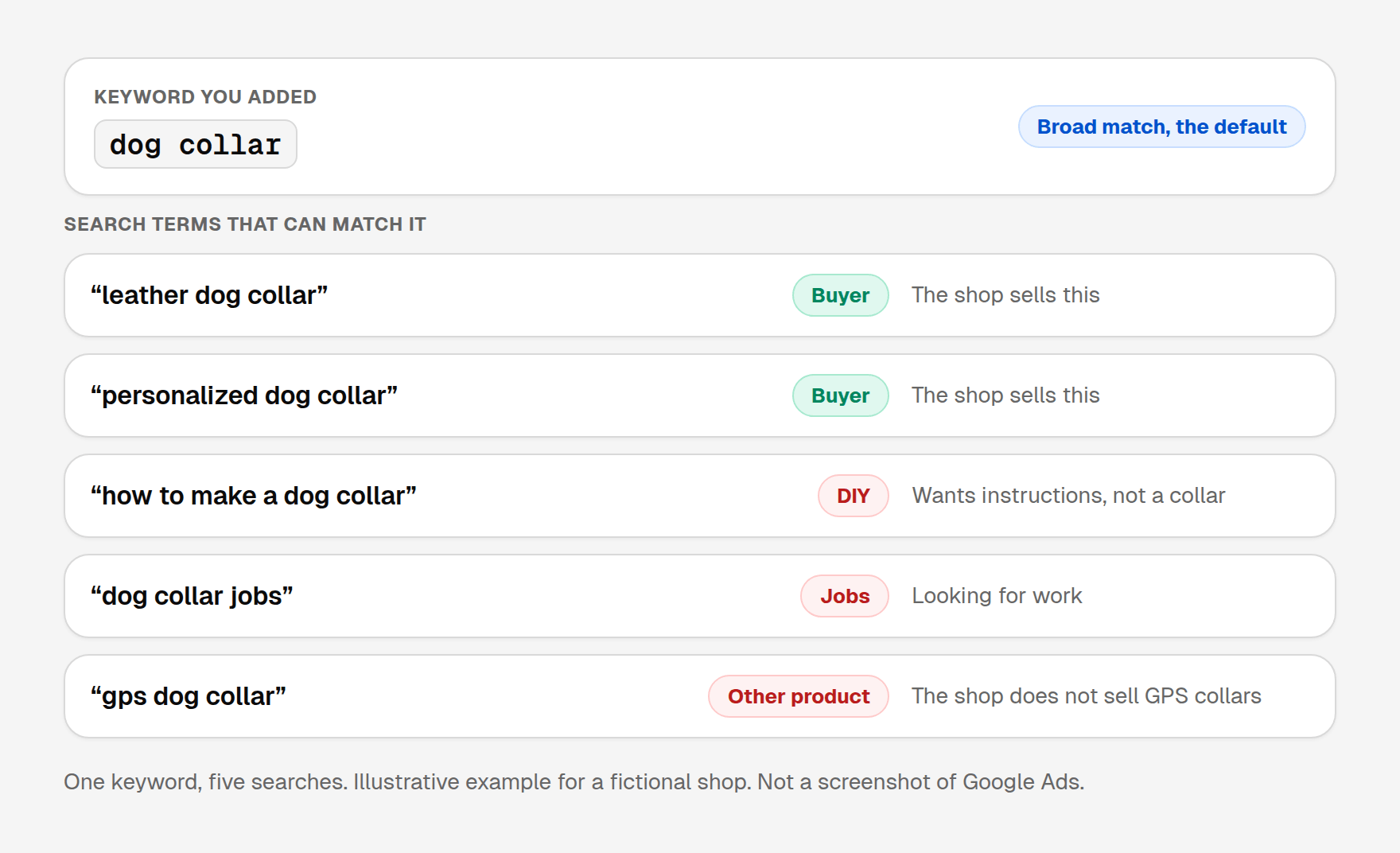
The picture below is a made-up shop, to show one keyword bringing in several searches. These are not real searches.
The match type column is a second match type
The Match type column is the search term match type: how close that search was to the keyword that triggered the ad. It can differ from the match type you set on the keyword.
Google says "a search term match type listed in your report might not be the same as the match type you've selected for the keyword that triggered the ads. This is because keywords with broader match types can still match search terms in narrower ways" (About the search terms report, Google Ads Help).
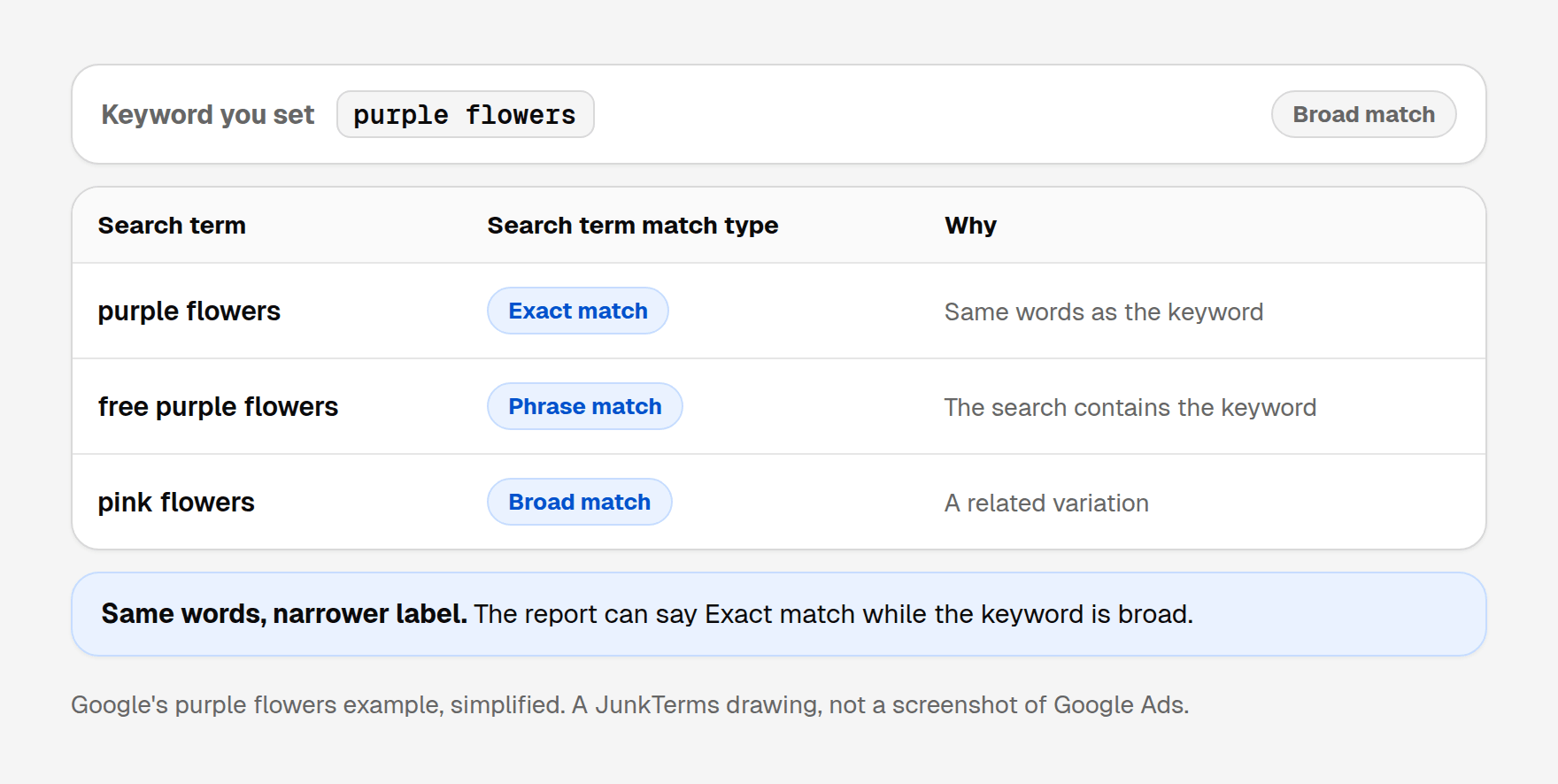
Google's example: someone searches "purple flowers", the keyword purple flowers is broad, and the search term match type is still exact match, because the words are the same.
The help page sets up three ad groups. A has exact [purple flowers]. B has phrase "purple flowers". C has broad purple flowers. This is Google's table from that page:
| Your keyword | Customer's search term | Search term match type | Why the report says that |
|---|---|---|---|
[purple flowers] | purple flowers | Exact match | Exact match to the exact keyword |
[purple flowers] | purple flowrs | Exact match (close variant) | Same meaning, with a misspelling |
"purple flowers" | purple flowers | Exact match | Exact match to the phrase keyword |
"purple flowers" | free purple flowers | Phrase match | The search contains the phrase keyword |
"purple flowers" | free purple flowrs | Phrase match (close variant) | Close variant of the phrase keyword |
purple flowers (broad) | purple flowers | Exact match | Same words as the broad keyword |
purple flowers (broad) | free purple flowers | Phrase match | The search contains the broad keyword |
purple flowers (broad) | pink flowers | Broad match | A variation of the broad keyword |
The sixth row is the one that surprises people. A broad keyword can sit next to an "Exact match" label. The Keyword column is what names the keyword that actually matched. Match type alone does not.
How to see your own search terms
Google's steps (About the search terms report, Google Ads Help):
- Select Campaigns in the left menu.
- Open Search terms inside Insights and reports.
- Set a date range first. A recent week is enough for a routine look. A longer range is a better first pass, and a larger file.
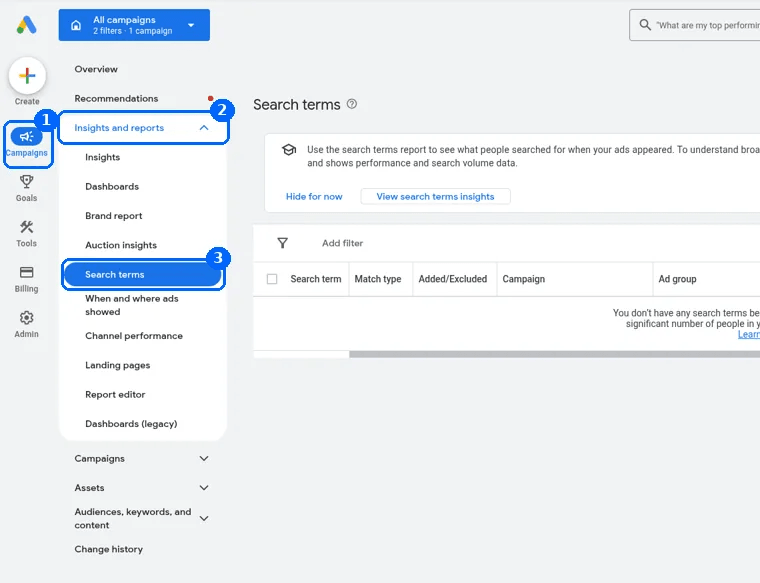
Those columns are Search term, Match type, Added/Excluded, Campaign and Ad group. Search term is what the person typed. Match type is the search term match type, which can differ from your keyword's match type. Added/Excluded shows whether that search is already a keyword or a negative. The search terms report guide covers the CSV download, the totals row, and which columns matter for negatives.
The Keyword column names which of your keywords matched the search. Google says it "doesn't show by default". Turn it on from the columns icon, then Attributes, check Keyword, and select Apply (same page). Google's example: a tulip seller sees the broad keyword flowers match "red roses" and "purple orchids", then tightens the list to tulips.
Read Keyword and Match type together. For Dynamic Search Ads and Shopping, the keyword field stays empty and the match type says Exact, because those targets are not keywords.
On search partners, a search term "may appear longer than normal or may be formatted differently", because the ad can show on a directory page or another page related to the search, not only on a results page (same page).
What to do with the wrong searches
"If a search term isn't relevant enough to the products or services you offer, add it as a negative keyword." Google's example is an eyeglasses shop showing for "wine glasses": add "wine" as a negative (About the search terms report, Google Ads Help). A shop that sells dog clothes can target "pet clothes" and add "cat" so cat-clothes searches stay off (About keywords, Google Ads Help).
Two limits first:
- Negatives skip close variants. "Negative keywords won't match to close variants or other expansions." A negative for "flowers" stops "red flowers" and still allows "red flower". Add synonyms, singulars and plurals yourself. Casing and misspellings are already covered (About negative keywords, Google Ads Help). Negative keyword match types shows how broad, phrase and exact negatives differ from positive keywords.
- A long list can hide you from customers. "If you use too many negative keywords, your ads might reach fewer customers" (About negative keywords, Google Ads Help). The report shows how each search performed, so leave a search that led to a sale.
You can also change the keyword's match type. Google lists that as a use of this report: edit broad, phrase, exact, or negative, and use the Match type column to see how matching is affecting results (About the search terms report, Google Ads Help). Phrase match uses quotes, as in "tennis shoes". Exact match uses brackets, as in [red shoe] (About keyword matching options, Google Ads Help). Move a keyword from broad toward phrase or exact when the extra searches are the problem and you still want that keyword.
Some searches never appear
The report lists searches a significant number of people used that triggered your ad. Google leaves the rest out: "Some search terms that don't have enough query activity are omitted from the search terms report in order to keep with our standards on data privacy" (About the search terms report, Google Ads Help).
You can act on the rows you can see. A negative for a junk word also covers later searches that contain it, including ones that never become their own row. New visible searches show up as people search in new ways, so a short weekly look beats one annual export.
A worked example
A small online shop sells handmade leather dog collars. It added dog collar with no quotes and no brackets, so the keyword is broad match. The search term match types below follow Google's purple flowers rule: the same words as a broad keyword are reported as an exact match, and a search that contains the keyword is reported as phrase match.
Illustrative example with a fictional shop. These are not real searches from a client account, and no results are claimed.
| Search term | Search term match type | Why it can show | What to do |
|---|---|---|---|
| dog collar | Exact match | Same words as the broad keyword | Keep it. This is the product |
| leather dog collar | Phrase match | The search contains the keyword | Keep it. The shop sells this |
| personalized dog collar | Phrase match | The search contains the keyword | Keep it if the shop makes these |
| how to make a dog collar | Phrase match | Broad match reached a how-to search | Add a negative for the how-to phrase if you only sell finished collars |
| dog collar jobs | Phrase match | Broad match reached a jobs search | Add jobs and job. A negative does not cover the other form |
| gps dog collar | Phrase match | A related product the shop does not sell | Add gps if that product never sells |
One keyword can return all six. The first three can be buyers. Add the last three as negatives when they are not what you sell, and add both job and jobs.
A short weekly check
- Open Campaigns, Insights and reports, Search terms, for the last 7 days.
- Turn on Keyword if it is hidden: columns icon, Attributes, Keyword, Apply.
- Sort by cost. Read the search term, the search term match type, and the keyword that matched.
- An empty keyword and match type "Exact" points at Shopping or Dynamic Search Ads.
- Add a negative for a search that can never become a customer, plus the plural or synonym. Leave a search that sold.
- If one broad keyword keeps bringing the wrong searches, change it to phrase or exact, then read the report again next week.
Let JunkTerms do the weekly check
JunkTerms reads your search terms every Monday, flags the likely junk with a plain reason, keeps searches that converted, and adds only the negatives you approve. It never changes bids, budgets, ads or the keywords you bid on. The script starts in a dry run and adds nothing to Google Ads until you switch that off. With a CSV, you copy the approved negatives and add them yourself. How it works shows both.
Want that weekly check done for you? Analyze your search terms CSV free (no signup). It counts the likely junk in the file you download from Google Ads, and an email opens the full list. No file? Try a sample account on the same page.
FAQ
Is a search term the same as a keyword? No. A keyword is what you add to an ad group. A search term is what a person types. In Google's example, "red roses" is the search term and "roses" can be the keyword.
Why is my ad showing for searches I didn't add? Broad match is the default and can match related searches. Close variants apply to every match type, with no opt-out. Shopping and Dynamic Search Ads do not use keywords, so the searches come from your products or your site.
Do I pay for the keyword or the search term? Your ad enters an auction when a search matches a keyword. The search terms report lists the searches that triggered your ads and how they performed. The keyword list does not list those searches.
What does the Keyword column show? Which of your keywords matched the search and triggered the ad. In Google's example, a tulip shop's broad keyword "flowers" matches "red roses" and "purple orchids".
Why is there no Keyword column on my search terms report? It is off by default. Select the columns icon, then Attributes, check Keyword, and select Apply.
Is the match type in the report the same as my keyword's match type? It can differ. The column is the search term match type. Google's example: the search "purple flowers" on the broad keyword purple flowers is reported as an exact match, because the words are the same.
Do Shopping campaigns and Dynamic Search Ads use keywords? No. Google says those targets do not use keywords. In the report those rows have no keyword, and the match type says Exact.
Does a negative keyword block close variants? No. Negatives do not match close variants. A negative for "flowers" blocks "red flowers" and still allows "red flower". Add the singular, the plural and synonyms yourself. Casing and misspellings are already handled.
Why are some search terms missing from the report? Google omits search terms that do not have enough query activity, to meet its privacy standards. The report shows searches a significant number of people used that triggered your ad.
How often should I check search terms? New searches keep arriving, and low-volume ones stay hidden. A weekly look at the visible rows is enough for a small account: negative searches that can never convert, and leave searches that sold.
Every account gets one free analysis: run the script or upload a CSV (up to 1,000 terms).