2026-10-23
Why Google Ads shows irrelevant search terms (and how to stop it)
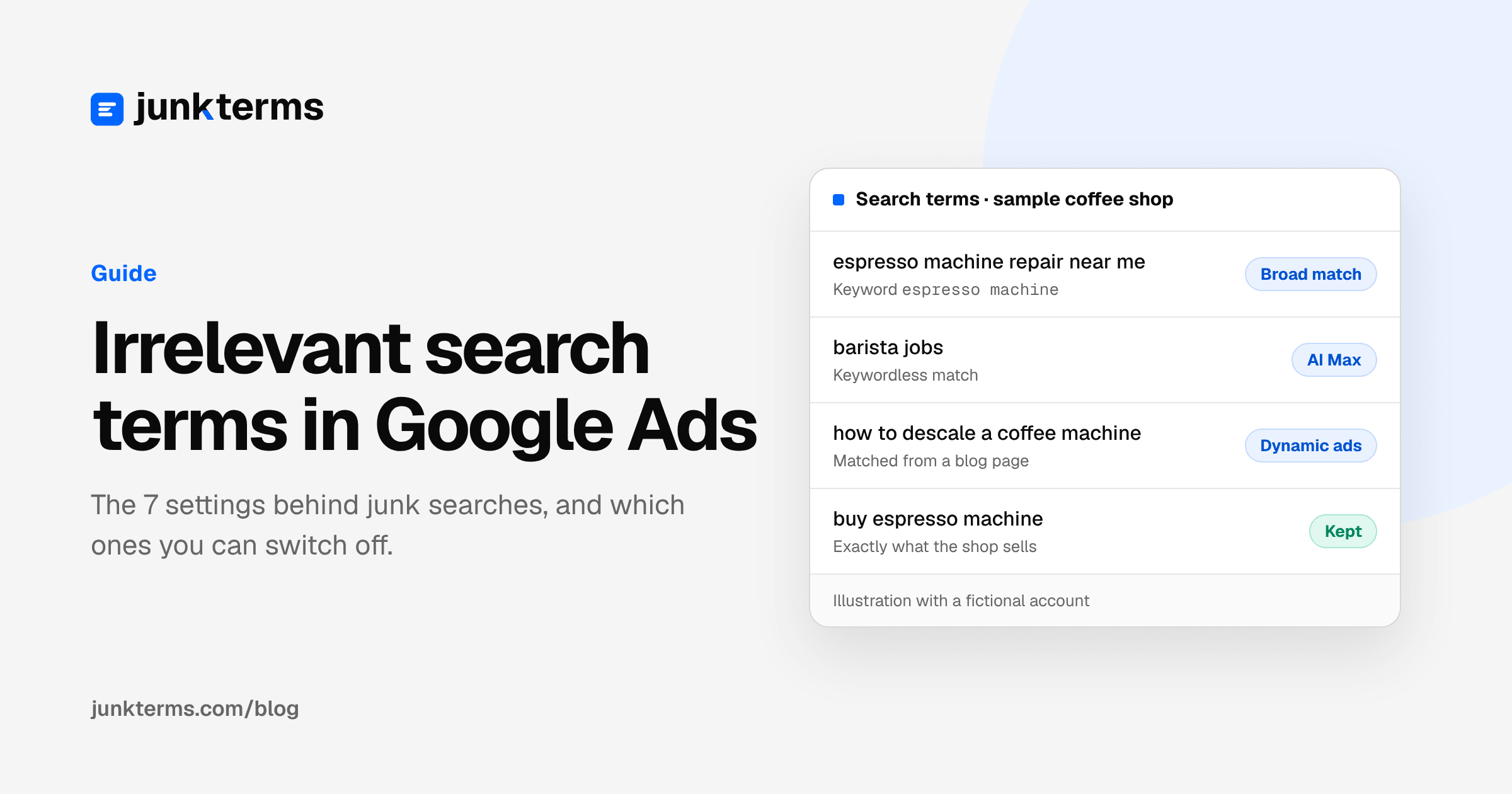
You picked your keywords carefully. Then you open the search terms report and find searches you would never have chosen: jobs, repairs, free stuff, things you don't even sell. You didn't add those words anywhere, so where do they come from?
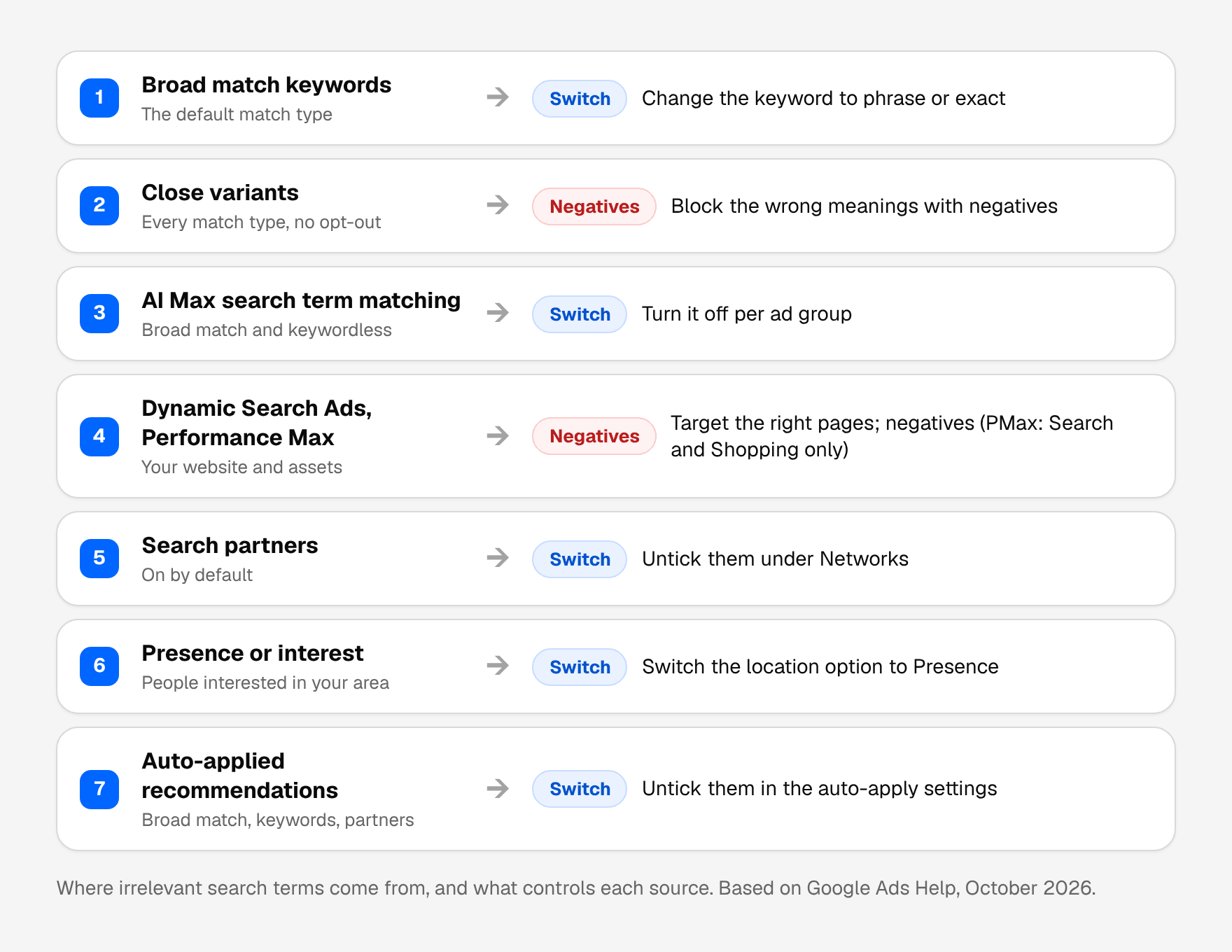
Almost always from a setting. Google Ads matches your ads to more than the exact words you typed, and several features widen that net further. Most of them are on by default. Here are the seven usual causes, what each one does, and which ones you can switch off.
Quick reminder: a keyword is what you bid on. A search term is what someone actually typed before your ad showed. The search terms report lists those searches. If you are new to it, our guide to the search terms report explains the columns.
1. Broad match is the default
When you add a keyword without quotes or brackets, it's a broad match keyword. Google says broad match is "the default match type that all your keywords are assigned", and that with it, ads may show on searches that are related to your keyword, which "can include searches that don't contain the direct meaning of your keywords" (About keyword matching options, Google Ads Help).
To decide what's related, broad match may also look at the person's recent searches, your landing pages and assets, and the other keywords in the ad group. So a broad keyword like espresso machine can show for searches that don't contain those words at all.
Broad match isn't wrong: it finds searches you'd never think of, and Google says to use it with Smart Bidding. But most people never chose it on purpose.
Fix: if a keyword brings mostly junk, change it to phrase ("espresso machine") or exact ([espresso machine]). Keep broad only where the extra searches actually turn into sales, and check them every week.
2. Close variants: every match type, no opt-out
Phrase and exact match are narrower, but they aren't literal either. Google says that by default, all keyword match types are eligible to match to close variants, and "there's no way to opt out" (Keyword close variants: Definition, Google Ads Help).
For exact and phrase match, close variants may include misspellings, plurals, reordered words, small words like "for" or "the", implied words, synonyms and paraphrases, and searches with the same intent. Google's own example: the exact keyword [images royalty free] may also show on searches for "free copyright images".
![Table for the exact match keyword [espresso machine] showing the kinds of close variants Google may match: espresso machines (a plural), machine espresso (reordered words), espresso machine for home (function and implied words), coffee maker with steam wand (a synonym or paraphrase) and best espresso maker (same intent). There is no way to opt out, so the fix is a negative keyword.](/_next/image?url=%2Fimages%2Fguides%2Fclose-variants-keywords.png&w=3840&q=90&dpl=dpl_Gjjb1QsAtFzvXhANUAJUBUCJi8jU)
This is why an exact keyword can still bring a search you'd call irrelevant. The variant looked close to Google, not to you.
Fix: you can't turn close variants off, so block the wrong meanings with negative keywords. One thing works in your favor here: negative keywords don't match close variants (About negative keywords, Google Ads Help), so a negative blocks exactly what you tell it to, and you add plurals and synonyms yourself. Our guide to negative keyword match types shows how.
3. AI Max is on in the campaign
AI Max is a set of features for Search campaigns. Turning it on turns on search term matching, which, in Google's words, uses broad match and "keywordless technology" to find more searches, learning from your keywords, ads and landing pages (How AI Max for Search campaigns works, Google Ads Help). In other words, your ad can show for searches that none of your keywords would match on their own.
Google also says campaigns that used the old broad match campaign setting are upgraded into AI Max. So it can be on even if you don't remember choosing it.
Fix: in the search terms report, AI Max searches show "AI Max" in the match type column, and a source column says whether the match came from broad match expansion or keywordless matching. If those searches are mostly junk, you can turn search term matching off for an ad group in the ad group settings, or turn AI Max off for the campaign (Set up AI Max for Search campaigns, Google Ads Help). Before you switch AI Max off completely, note that Google says it also disables the brand exclusions that live inside it (AI Max FAQ, Google Ads Help).
4. Your website picks the searches: Dynamic Search Ads and Performance Max
Some campaigns don't need keywords at all. Dynamic Search Ads use the content of your website to decide which searches to show for (About Dynamic Search Ads, Google Ads Help). If your site has a blog post about cleaning a coffee machine, a "how to descale" search can get your ad, even though you only want to sell machines. Google's page also says Dynamic Search Ad campaigns are being upgraded to AI Max starting in February 2027.
Fix: for Dynamic Search Ads, point them at the pages that sell (product and category pages), not your whole site, and use negatives. Google itself says they work best when you check your search terms report regularly and use negative keywords. For Performance Max, add negatives for the junk words, but remember Google says they apply to Search and Shopping inventory only (Negative keywords in Performance Max campaigns, Google Ads Help). Our guide to Performance Max search terms shows where to find what people typed.
5. Search partners are switched on
A Search campaign can also show on Google search partners: other websites, plus YouTube search results and Watch pages. Google says search partners are included by default when you create a Search campaign, and that clicks from some of these sites "may not always reflect highly targeted traffic". It also says Google Ads doesn't tell you which partner site your ad showed on, unless you're running Performance Max (About the Google Search Network, Google Ads Help).
Partner searches can also be spoken or a click on a suggested search (Search partners: Definition, Google Ads Help).
Fix: segment your campaign results by network and compare Google Search with search partners. If partner traffic doesn't sell, open the campaign settings, then Networks, and untick "Include Google search partners".
6. Your location setting reaches people somewhere else
This one shows up as searches for towns or countries you don't serve. Google's recommended location option, "Presence or interest", reaches people in your target area and also people who "have shown an interest in" it (Target ads to geographic locations, Google Ads Help). Google also says location targeting is a best effort and isn't guaranteed to be accurate every time.
For an online shop that ships nationwide this is usually fine. For a local business, or a shop that only ships to some countries, it can bring searches from people who can never buy.
Fix: if you only serve the people who are physically in your area, switch the campaign's location option to "Presence". Add the places you don't serve as negatives or location exclusions.
7. A recommendation was applied for you
Google Ads can apply some recommendations automatically. The list Google publishes includes "Add broad match keywords", "Add keywords", "Expand your reach with Google search partners" and "Add dynamic search ads" (About applying recommendations automatically, Google Ads Help). Each one can bring new kinds of searches, and the change happens without you opening the campaign.
Fix: open Recommendations, then the auto-apply settings, and see which types are ticked. Untick the ones that widen your targeting if you'd rather review them yourself. The "History" tab and the account's change history show what was applied and when.
How to see why a search matched
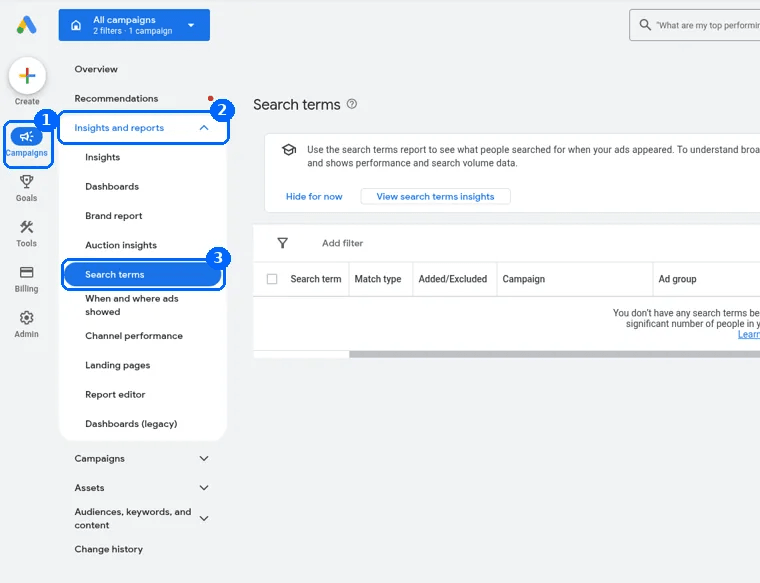
Before you change anything, look at what the report tells you. Open Campaigns, Insights and reports, Search terms (About the search terms report, Google Ads Help).
- Sort by cost and start with the searches that spent money and didn't convert.
- Read the Match type column. It tells you which keyword type matched the search. With AI Max on, "AI Max" appears here, and the source column says broad match expansion or keywordless.
- Read the Campaign and Ad group columns. A junk search from a Dynamic Search Ads ad group or a Performance Max campaign points to cause 4, not to your keywords.
- Segment by network to see if the junk comes from search partners (cause 5).
- Check the change history if the junk started on a specific day. A new setting or an applied recommendation (cause 7) is the usual reason.
Some low-volume searches are left out of the report for privacy reasons, so you won't see every search. Broad negatives for junk words catch those too.
A worked example
Here is one week of search terms for a fictional online coffee shop that sells espresso machines and beans, with the setting behind each junk search.
Illustrative example with a fictional shop. These are not real searches from a client account, and no results are claimed.
| Search term | Match type or campaign | Why it showed | Fix |
|---|---|---|---|
| espresso machine repair near me | Broad: espresso machine | Broad match found a related search | Add repair as a negative |
| barista jobs | AI Max (keywordless) | Search term matching on the Machines ad group | Add jobs, or turn search term matching off there |
| how to descale a coffee machine | Dynamic Search Ads | The ad group targets the whole site, blog included | Target product and category pages only |
| espresso machines | Exact: [espresso machine] | Close variant (plural) | Keep it: same product |
| coffee maker with milk frother | Exact: [espresso machine] | Close variant (same intent) | Keep it if it sells, block if not |
| free coffee samples | Performance Max | Matched from the shop's assets | Add free as a Performance Max negative |
| buy espresso machine | Phrase: "espresso machine" | Exactly what the shop sells | Keep it |
The pattern to copy: first find the setting behind the search, then decide. Fix the setting when it keeps bringing junk (a Dynamic Search Ads target, search term matching on one ad group). Use a negative when the setting is worth keeping but one word isn't. And keep the close variants that are really the same product.
Don't switch everything off
Each of these features also brings searches that sell, which is why Google turns them on. Switching all of them off at once can cut good traffic along with the junk, and Google warns that too many negative keywords can also mean your ads reach fewer customers (About negative keywords, Google Ads Help).
A safer order: first add negatives for the junk words that are wrong for your whole business (jobs, free, repair if you don't repair), on a list applied to every campaign. Then look at what's left. If one setting still brings mostly junk after that, change that one setting and compare the next few weeks. Our list of common negative keywords covers the nine junk patterns almost every account has, and our starter lists by industry give you words to begin with.
A short weekly check
- Open the search terms report for the last 7 days and sort by cost.
- For each search that could never become a customer, check the match type and campaign columns to see which setting brought it.
- Add the junk word as a negative, plus its plural and synonyms. Our practical guide to Google Ads negative keywords shows where to put it.
- If one setting keeps bringing junk week after week, change that setting.
- Next week, check that the junk is gone. If it isn't, our guide on negative keywords not working lists the usual reasons.
Let JunkTerms do the weekly check
JunkTerms flags the likely junk in your search terms with a plain reason, keeps searches that converted, and suggests negatives for you to approve. With the JunkTerms script, it reads your search terms every week and adds only the negatives you approve to Google Ads. It never changes bids, budgets, ads, settings or the keywords you bid on, and it starts in a dry run that adds nothing until you switch it on. With a CSV file instead, you copy the approved negatives and add them yourself. How it works shows both ways step by step.
Want to see how many irrelevant searches you're paying for? Analyze your search terms CSV free (no signup): it counts the likely junk in the file you download from Google Ads, and an email opens the full list. No CSV? Try a sample account on the same page.
FAQ
Why does Google Ads show my ads for irrelevant search terms? Usually because of a setting: broad match keywords, close variants, AI Max search term matching, Dynamic Search Ads or Performance Max, search partners, the "Presence or interest" location option, or a recommendation that was applied automatically. The match type and campaign columns in the search terms report show which one.
Can I turn off close variants in Google Ads? No. Google says all match types are eligible to match close variants and there's no way to opt out. Use negative keywords to block the variants you don't want.
Does exact match only show my ad for the exact keyword? No. Exact match can also show for close variants with the same meaning or intent, like plurals, reordered words, synonyms and paraphrases.
Is broad match the default in Google Ads? Yes. Google says broad match is the default match type for keywords. A keyword without quotes or brackets is broad.
How do I know if AI Max brought a search term? In the search terms report, the match type column shows "AI Max", and a source column says whether it came from broad match expansion or keywordless matching.
Can I turn off AI Max search term matching? Yes. You can turn search term matching off for an ad group in the ad group settings, or turn AI Max off for the whole campaign. Turning AI Max off also turns off the brand exclusions set inside it.
Should I turn off Google search partners? Check first. Segment your campaign by network and compare. If partner traffic spends money without sales, untick "Include Google search partners" in the campaign's Networks setting.
Why do I see searches for places I don't serve? The default "Presence or interest" option can reach people interested in your area, not only people in it. Switch to "Presence" if you only serve people who are there, and exclude the places you don't serve.
Do negative keywords stop irrelevant search terms? Yes, for the words you add. Negatives don't match close variants, so add plurals and synonyms yourself. In Performance Max they cover Search and Shopping inventory only.
Can JunkTerms find the irrelevant search terms for me? It reviews your search terms every week, flags the junk with a reason, keeps searches that converted, and adds only the negatives you approve. It never changes your settings, bids or budgets. You can try it free on a search terms CSV with no signup.
Every account gets one free analysis: run the script or upload a CSV (up to 1,000 terms).