2026-10-22
Google Ads negative keywords: a practical guide
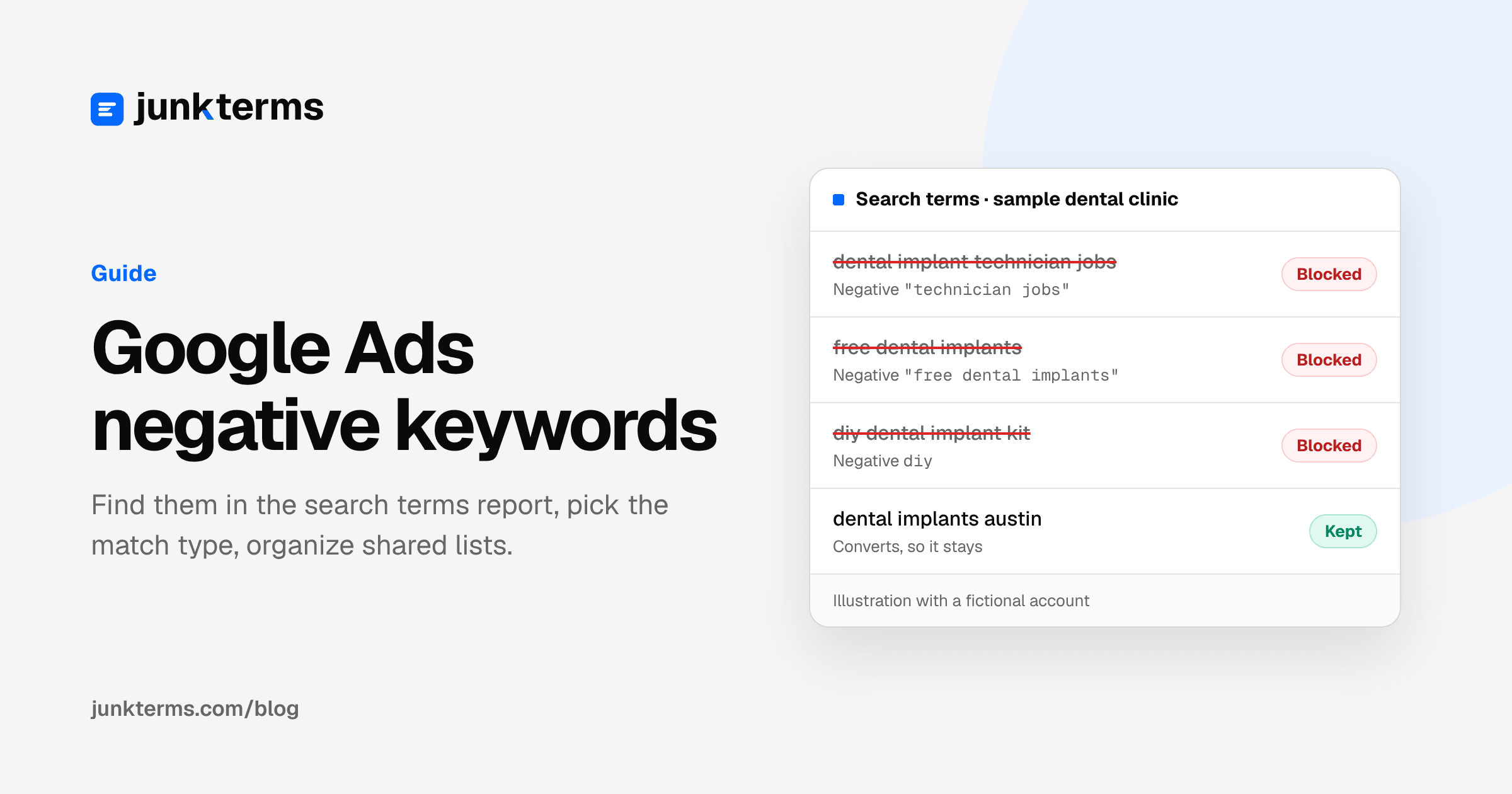
Negative keywords tell Google which searches should never show your ad. They are the cheapest control in Google Ads and the easiest one to get wrong. If you block too little, you pay for job seekers and people looking for free stuff. If you block too much, you quietly turn off searches that were selling.
This guide covers the three parts that matter: finding negatives in the search terms report, choosing the right negative match type, and organizing negatives in shared lists so they stay manageable.
What a negative keyword does (and what it does not)
A keyword is what you bid on. A search term is what the person actually typed. A negative keyword is a rule that says "do not enter the auction for searches like this."
Google's own example in About negative keywords: an optometrist selling eyeglasses may want to block searches like "wine glasses" and "drinking glasses." Those searches share a word with the business but not the intent.
Negatives do not change bids, budgets or ads. They only remove searches. That is why a careless negative is dangerous: nothing breaks visibly. You just stop seeing traffic you would have wanted.
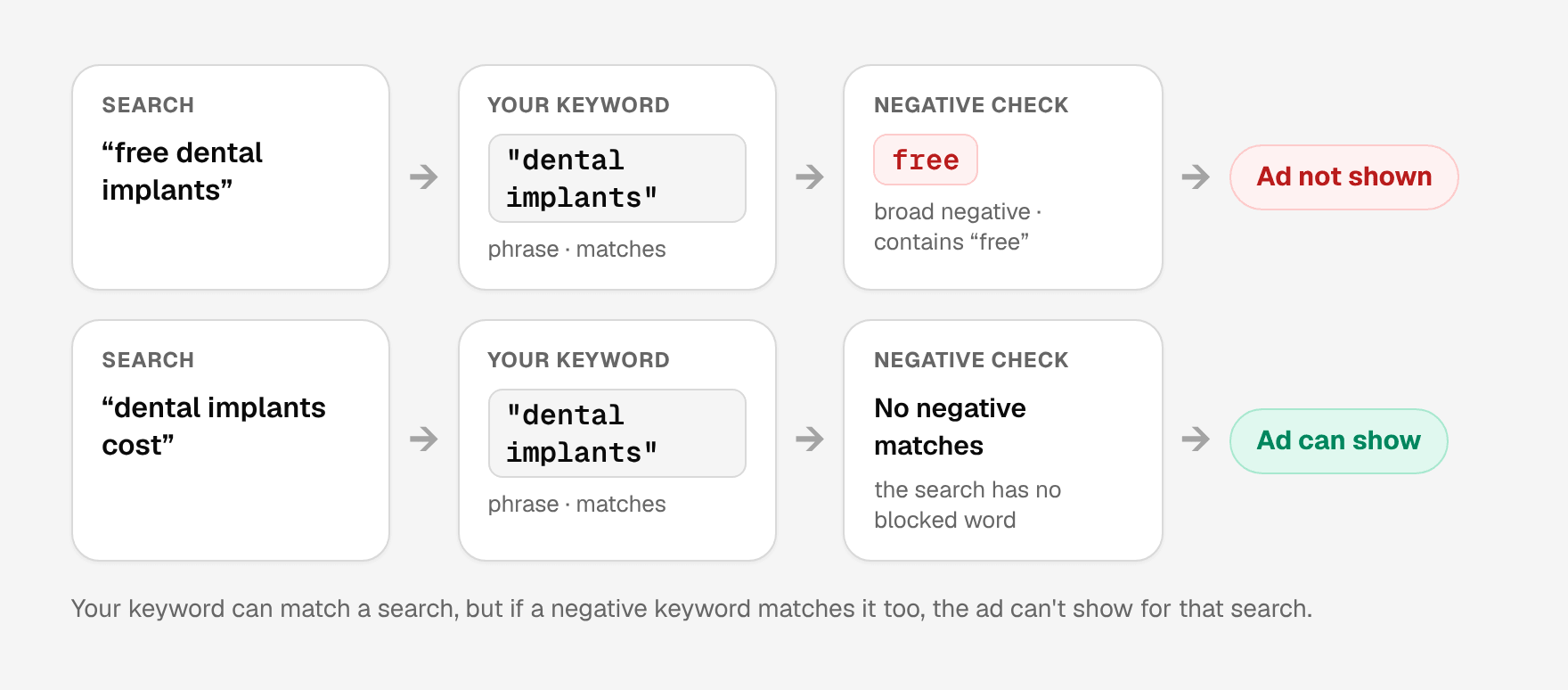
It helps to think of negatives as a filter that sits on top of your keywords. Your keywords, together with their match types, decide the set of searches that can trigger an ad. Negatives subtract from that set. They never add reach, and they don't make a keyword more relevant; they only stop specific searches from reaching the auction. That is also why negatives are the right fix for a wrong-intent search and the wrong fix for a search that is relevant but expensive. If a relevant search costs too much, look at the bid, the ad or the landing page instead.
Step 1: find negatives in the search terms report
Generic lists are a reasonable starting point, but your own report is the only real source. Google describes the search terms report as the list of searches that triggered your ads, and its guide Get negative keyword ideas using the search terms report walks through the workflow.
- In Google Ads, open Campaigns, then Insights and reports, then Search terms.
- Pick a date range. A week works for a routine check. A longer range helps the first time you clean an account.
- Sort by cost. Read the terms that spent money and did not convert before you read the long tail.
- Tick the terms you want to block and click Add as negative keyword.
- Choose where they go: the ad group or campaign where each term appeared, an existing negative keyword list, or a new list.
Two details from Google's help pages are worth knowing before you start:
- Negatives added from the report default to exact match in Search campaigns. If you want to block longer versions of the same search, change the match type before saving.
- The report is not complete. Google notes in About the search terms report that some low-volume terms are left out for privacy reasons. You can only block what you can see, so check the visible part regularly.
Which columns to look at: the search term itself, the keyword that triggered it, cost, clicks, conversions and the match type. The triggering keyword is the useful one. When the same broad keyword keeps pulling in the same kind of junk, that pattern is worth a negative on its own, and sometimes a tighter keyword match type is the better fix.
When you read the report, sort each term into one of three piles:
- Junk. A different intent entirely: jobs, a product you don't sell, a navigational lookup, piracy.
- Low intent. Related, but not ready to buy: free, cheap, reviews, how-to, training. Whether to block these depends on your business. A course business should not block "course".
- Keep. Commercial language, your brand, your locations, or anything that converted. When you are unsure, keep it and look again next week.
Our guide to the search terms report explains the export and which columns matter.
Step 2: pick the right negative match type
This is where most mistakes happen, because negative match types do not behave like positive ones. Positive keywords match close variants, and Google says in Keyword close variants that there is no way to opt out of that. Negative keywords are the opposite: Google states that they "won't match to close variants or other expansions."
Google's example: a negative broad keyword flowers blocks "red flowers" but not "red flower." So if you want to block singular and plural forms, or synonyms, you add them yourself. Google also notes that negatives already account for casing and misspellings.
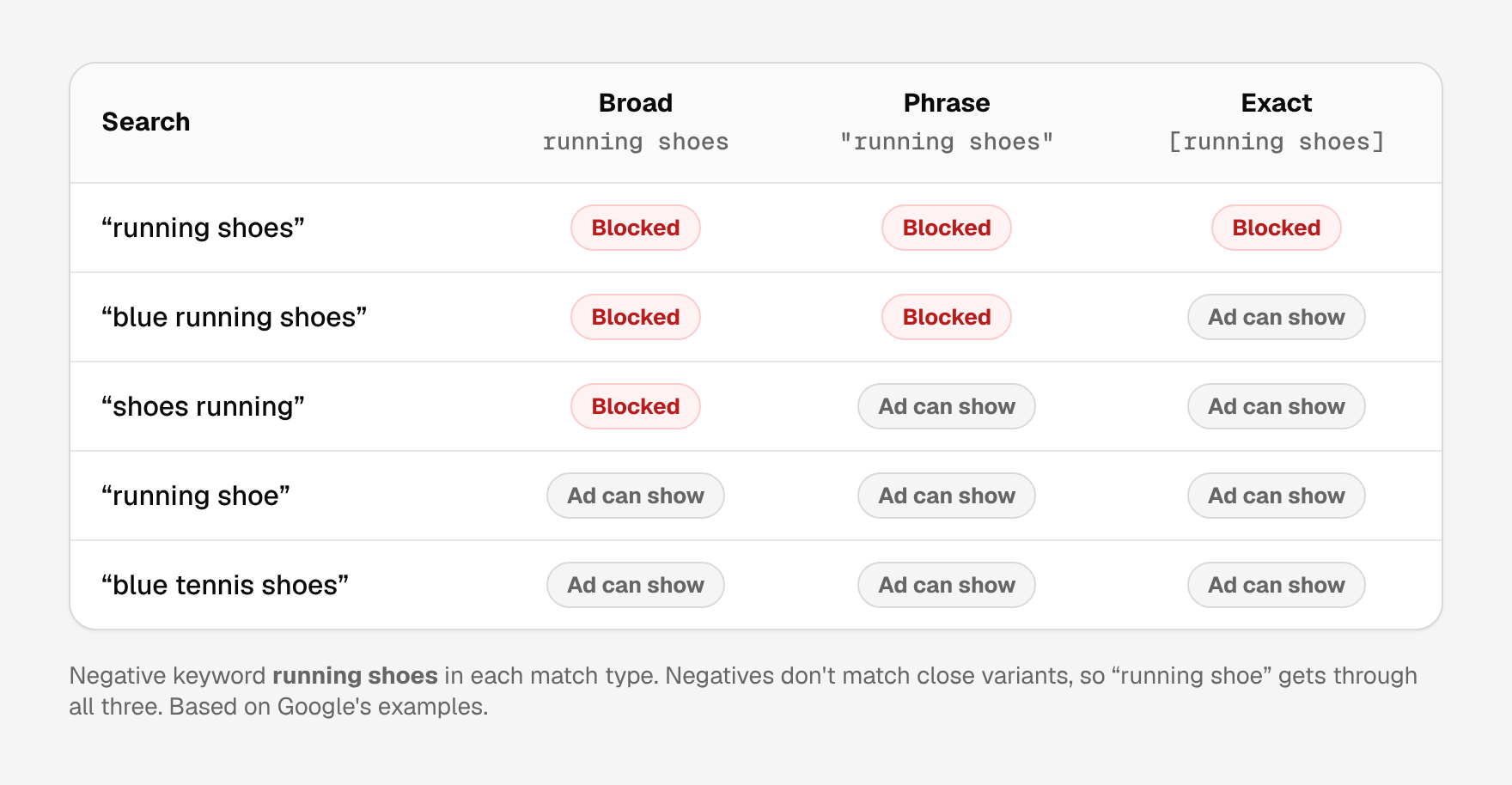
Here is how the three negative match types behave, using the definitions in About negative keywords, with the negative running shoes as the example:
- Broad (the default), typed
running shoes. Blocks searches that contain all the words, in any order: "shoes running", "blue running shoes". It does not block "running shoe". - Phrase, typed
"running shoes". Blocks searches that contain the words in this order, with extra words allowed: "blue running shoes", but not "shoes running". - Exact, typed
[running shoes]. Blocks searches that are exactly these words, with no extra words: "running shoes" only.
A practical way to choose:
- Phrase match is the safest default for a wasted search of two or more words. It blocks the search you saw and longer versions of it, without blocking each word on its own.
- Exact match fits when one exact search is the problem but its words also appear in good searches.
- Broad match is the widest. A single-word broad negative such as free blocks every search that contains that word. Use it only after checking what it would remove.
Before saving any negative, run two checks. Does it overlap with a keyword you bid on? Google warns in Add negative keywords to campaigns that an overlap will stop your ad from showing. And does it block a search term that converted? A phrase negative "dental implants" blocks "dental implants austin"; a phrase negative "free dental implants" does not. If a negative would block a good search, shorten it, switch it to exact, or leave it alone. More examples are in our guide to negative keyword match types.
Step 3: organize negatives with shared lists
Negatives can live in four places, and choosing the right one keeps an account auditable:
- Ad group. Applies to one ad group. Best for steering traffic between ad groups in the same campaign.
- Campaign. Applies to one campaign. Best for a term that is junk for one offer but fine for another.
- Negative keyword list. Applies to every campaign you attach it to. Best for business-wide junk themes reused across campaigns.
- Account level. Applies to Search and Shopping inventory across relevant campaign types. Best for a short list of terms that should never trigger any ad.
According to About negative keyword lists, you can create up to 20 lists per account with up to 5,000 negatives each, and a change to a list reaches every campaign that uses it. Account-level negatives are capped at 1,000 and apply to Search and Shopping inventory in Search, Performance Max, Shopping and other relevant campaign types, as explained in About account-level negative keywords.
To create a list, open the shared library in Google Ads, go to the negative keyword lists, click the plus button, name the list, paste one negative per line with match type symbols, and save. Then apply the list to campaigns. A list that is not attached to any campaign does nothing; it is a common reason a negative "isn't working."
A structure that stays readable:
- One list per theme, named for its job: "Jobs and careers", "Free and DIY", "Wrong products." Themes make it obvious why a term is there.
- Campaign negatives for exceptions. "Free" may be junk for a premium service and fine for a campaign promoting a free consultation.
- Account level for the few absolutes, such as terms that are unsafe for your brand.
If you also run Performance Max, see our guide to Performance Max search terms for how negatives work there. For theme ideas, see common negative keyword patterns.
A worked example
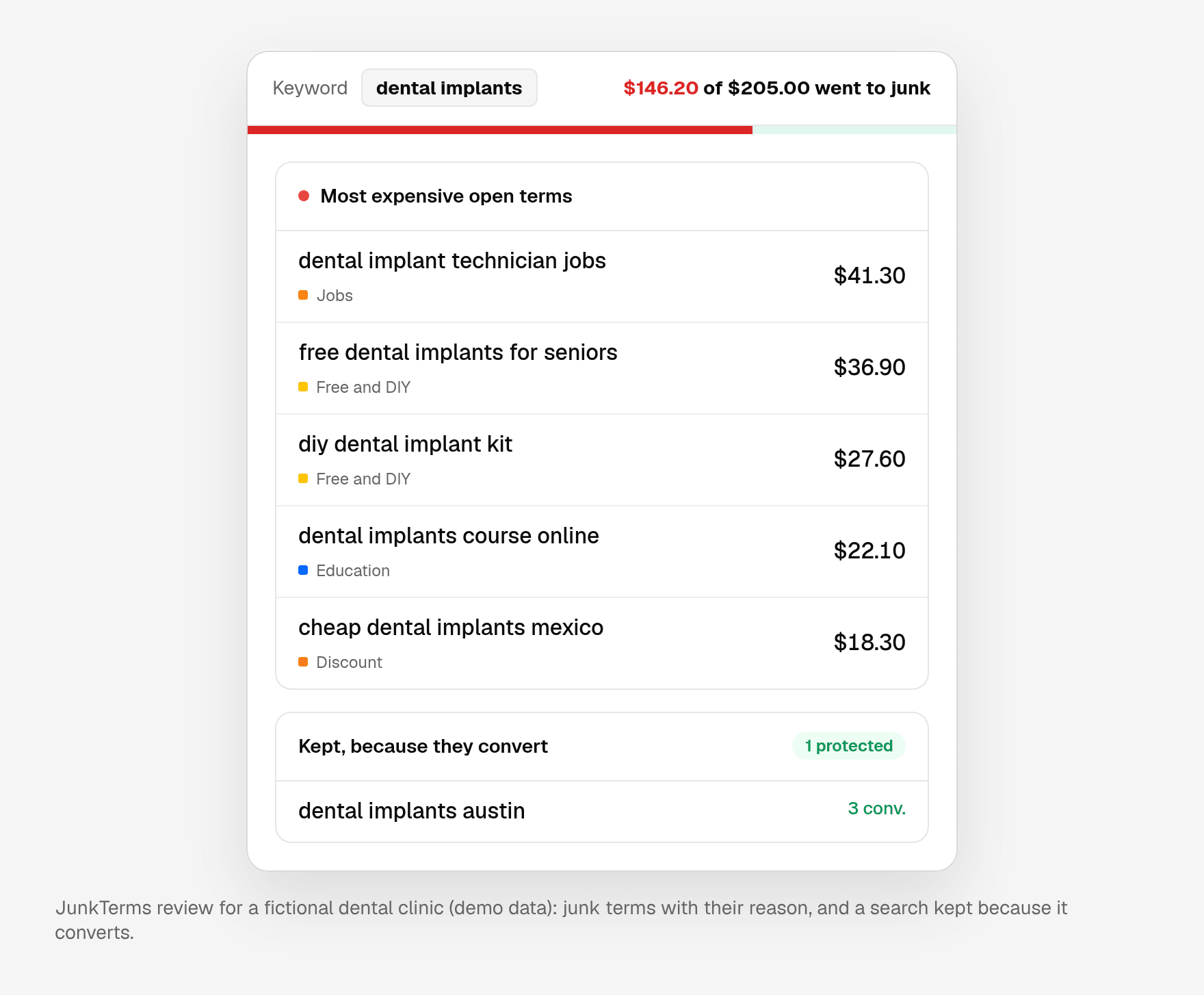
Here is how the three steps play out on a single report. The account is fictional: Northside Dental, a clinic in Austin bidding on "dental implants". The searches are the kind that show up for that keyword; the decisions follow the rules above.
Illustrative example with a fictional account. These are not real searches from a client account, and no results are claimed.
| Search term | Decision | Negative to add | Where it goes | Why |
|---|---|---|---|---|
| dental implant technician jobs | Block | jobs (broad) | List "Jobs and careers" | A job seeker, not a patient. "Jobs" never appears in a patient's search. |
| free dental implants for seniors | Block | "free dental implants" (phrase) | Campaign | Looking for a free programme. Phrase match leaves "free consultation" searches open. |
| diy dental implant kit | Block | diy (broad) | List "Free and DIY" | Wants to do it at home, which the clinic doesn't offer. |
| dental implants course online | Block | "dental implants course" (phrase) | List "Training" | Dentists looking for training, not patients. |
| cheap dental implants mexico | Block | mexico (broad) | Campaign | Outside the area the clinic serves. "Cheap" alone is not blocked: price searches can still book. |
| dental implants cost | Keep | None | None | Price research from someone who may book. Check conversions before blocking. |
| northside dental reviews | Keep | None | None | Someone looking up the clinic by name. |
| dental implants austin | Keep | None | None | The search the campaign exists for, and it converted. |
Three things to notice. Only one negative per junk search, at the shortest wording that removes it safely. The negatives that apply to any dental campaign go on themed lists, while the location negative goes on the campaign, because a second clinic location could need different rules. And the borderline searches stay until the clinic's own conversion data says otherwise.
Mistakes that make negatives fail
Most negatives that "don't work" fail for one of a handful of reasons. Google lists several of them in About negative keywords:
- Missing plurals and synonyms. Negatives don't match close variants, so
coursedoes not block "courses". Add the forms you see in the report. - Symbols that change the keyword. Google treats accents and ampersands as different keywords: "sidewalk cafe" and "sidewalk café" are two negatives, and so are "socks & shoes" and "socks and shoes". Periods are ignored, so "Fifth Ave." and "Fifth Ave" are the same.
- Very long searches. If a search is longer than 16 words and your negative comes after the 16th word, the ad can still show.
- Blocking a word you bid on. A negative that overlaps your own keyword stops that keyword from showing (Add negative keywords to campaigns).
- A list that isn't attached. A negative keyword list does nothing until it is applied to a campaign.
- Too many negatives. Google warns that if you use too many negative keywords, your ads might reach fewer customers. A long list of one-word broad negatives is the usual cause.
A quick audit catches most of these. Once a quarter, export your negatives, sort them by match type, and read the one-word broad negatives first. Each one should be a word that never appears in a search you want.
Make it a weekly habit
The report changes every week. New variants show up after you block old ones, so a one-time cleanup decays. A short weekly routine works better than a big quarterly one: sort the last seven days by cost, block the obvious junk on the right list, double-check anything borderline against conversions, and write down what you chose to keep so you don't review it again.
That weekly routine is what JunkTerms does. A Google Ads script reads your search terms, each suggested negative comes with a reason, searches that converted are kept, and nothing is added until you approve it. Approved account-wide negatives for Search go on a shared list named JunkTerms; Performance Max campaigns get them as campaign negatives. If you want to see it on your own data first, the free CSV demo counts the likely junk in a search terms export with no login, and an email opens the full list. Nothing is added to Google Ads from that page. When you want it every Monday, the plans start at $19 a month for one account, with $39 for up to three and $149 for up to fifteen, and a 14-day money-back guarantee instead of a trial.
FAQ
What is a negative keyword in Google Ads? A negative keyword tells Google not to show your ad for searches that match it. It removes unwanted searches without changing bids, budgets or ads.
Do negative keywords match close variants? No. Google states that negative keywords don't match close variants or other expansions, so add plurals and synonyms yourself. Casing and misspellings are handled automatically.
Which match type should I use for negative keywords? Phrase match is a safe default for multi-word junk searches. Use exact match when only one precise search is the problem, and broad match only after checking everything it would block.
Should I use a negative keyword list or campaign negatives? Use a shared list for junk that applies across campaigns, such as job searches. Use campaign negatives when a term is irrelevant for one offer but relevant for another.
How many negative keywords can I add? Google allows up to 20 negative keyword lists per account with up to 5,000 keywords each, and up to 1,000 account-level negatives.
Why is my negative keyword not working? The usual causes: the list is not attached to the campaign, the match type is exact so longer searches still get through, or you needed a plural or synonym that the negative doesn't cover.
Do negative keywords work in Performance Max? Yes. Performance Max takes campaign-level negatives (up to 10,000 per campaign), negative keyword lists and account-level negatives, and they apply to Search and Shopping inventory. Our Performance Max search terms guide covers the details.
How often should I add negative keywords? Once a week is a good rhythm for most accounts. New variants of the same junk keep appearing, so a short weekly check of the last seven days, sorted by cost, catches them before they add up.
Can negative keywords hurt performance? Yes. A negative that blocks a search you wanted removes that traffic without any warning, and Google notes that too many negatives can reduce your reach. Check each negative against searches that converted before you save it.
Do negative keywords block very long searches? Not always. Google says an ad can still show when the search is longer than 16 words and the negative keyword comes after the 16th word.
Do symbols and accents matter in negative keywords? Yes. Google treats accents and ampersands as different keywords, so "café" and "cafe", or "&" and "and", need their own negatives. Periods are ignored.
Every account gets one free analysis: run the script or upload a CSV (up to 1,000 terms).