2026-10-23
Negative keywords not working? 7 reasons and simple fixes
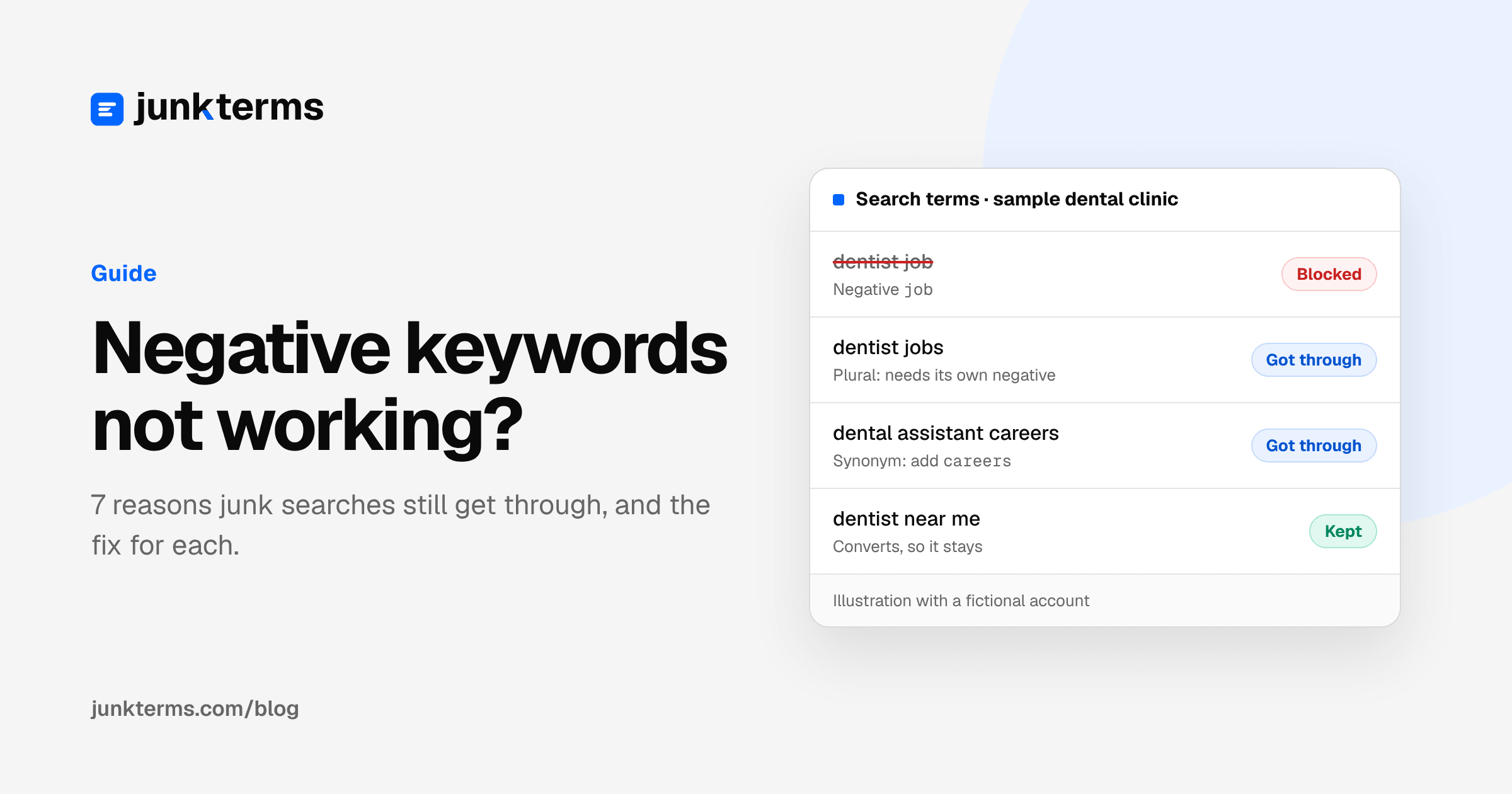
You added a negative keyword. A week later, the same kind of junk search is still in your search terms report, still costing you clicks. It feels like Google is ignoring you.
Usually it isn't. Negative keywords follow a few rules that are easy to miss if you don't spend all day in Google Ads. Here are the seven most common reasons, what to do about each one, and a simple way to check that a negative is really working.
Quick reminder: a negative keyword is a word you give Google so your ad doesn't show when someone searches it. The search terms report is the list of what people actually typed before your ad showed. If you are new to both, start with our practical guide to Google Ads negative keywords.
1. You blocked "job" but not "jobs"
Normal keywords match lots of similar searches. Negative keywords don't. Google says negatives "won't match to close variants or other expansions" (About negative keywords, Google Ads Help). Google's own example: the negative "flowers" stops your ad for "red flowers", but the ad can still show for "red flower".
So you have to add plurals, singulars and synonyms yourself. Blocking "job" won't block "jobs", "careers" or "hiring".
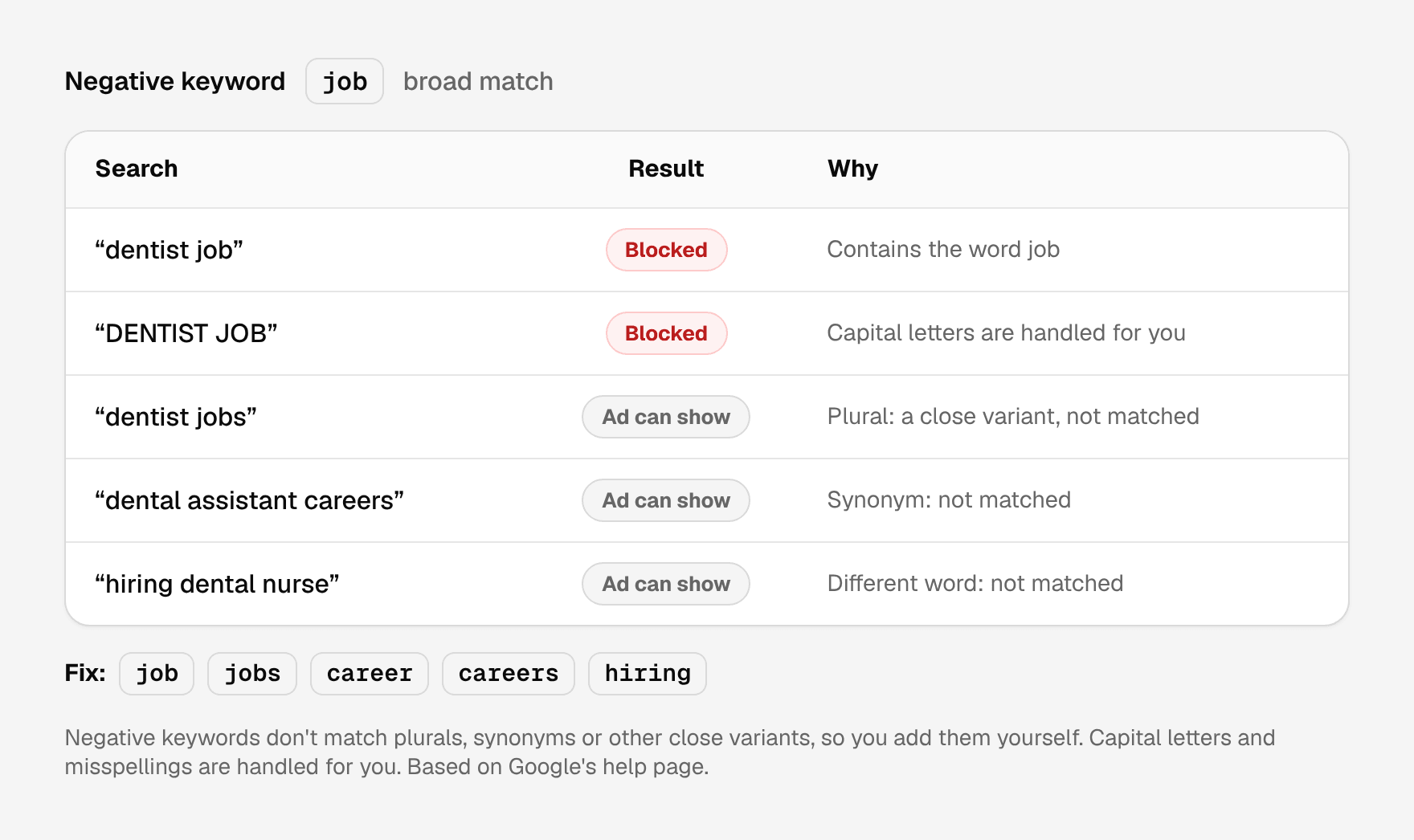
The good news: the same page says negatives already handle capital letters and misspellings, so you don't need to add those.
Fix: for every junk word, add the plural and the obvious other ways to say it. For jobs: job, jobs, career, careers, hiring, salary.
2. You used the wrong match type
Negatives come in three kinds, and they block different things (About negative keywords, Google Ads Help):
- Broad (just the words, like
free trial): blocks a search that contains all your words, in any order. It's the default. - Phrase (in quotes, like
"free trial"): blocks a search that contains those words in that exact order, even with other words around them. - Exact (in brackets, like
[free trial]): blocks only that exact search, with nothing added.
If you added [cheap shoes] as exact, a search for "cheap shoes near me" still gets through. If you added "shoes cheap" as phrase, "cheap shoes" gets through, because the words are in a different order.
Fix: for single junk words (free, jobs, diy), a plain broad negative is usually the right choice. Use phrase when the words only mean junk together, and exact only when you want to block one exact search and nothing more. Our guide to negative keyword match types has more examples.
3. Your negative keyword list isn't applied to the campaign
A negative keyword list does nothing on its own. After you create it, you have to apply it to your campaigns. A new campaign doesn't get it until you apply the list to that campaign too.
This one catches a lot of people after a busy season: the old campaigns are clean, then a new campaign for an offer or a new service goes live without the list, and the junk comes straight back.
Fix: open the list in Google Ads and check which campaigns it's applied to. Every time you launch a new campaign, apply your lists to it.
Also good to know: one list holds up to 5,000 negatives, and an account can have up to 20 lists (About negative keyword lists, Google Ads Help).
4. You added it to one ad group, not the whole campaign
You can add a negative to a single ad group or to the whole campaign. If you added it to one ad group, the other ad groups in the same campaign can still show for that search.
It's easy to do by accident: you spot a junk search while looking at one ad group, add the negative right there, and move on.
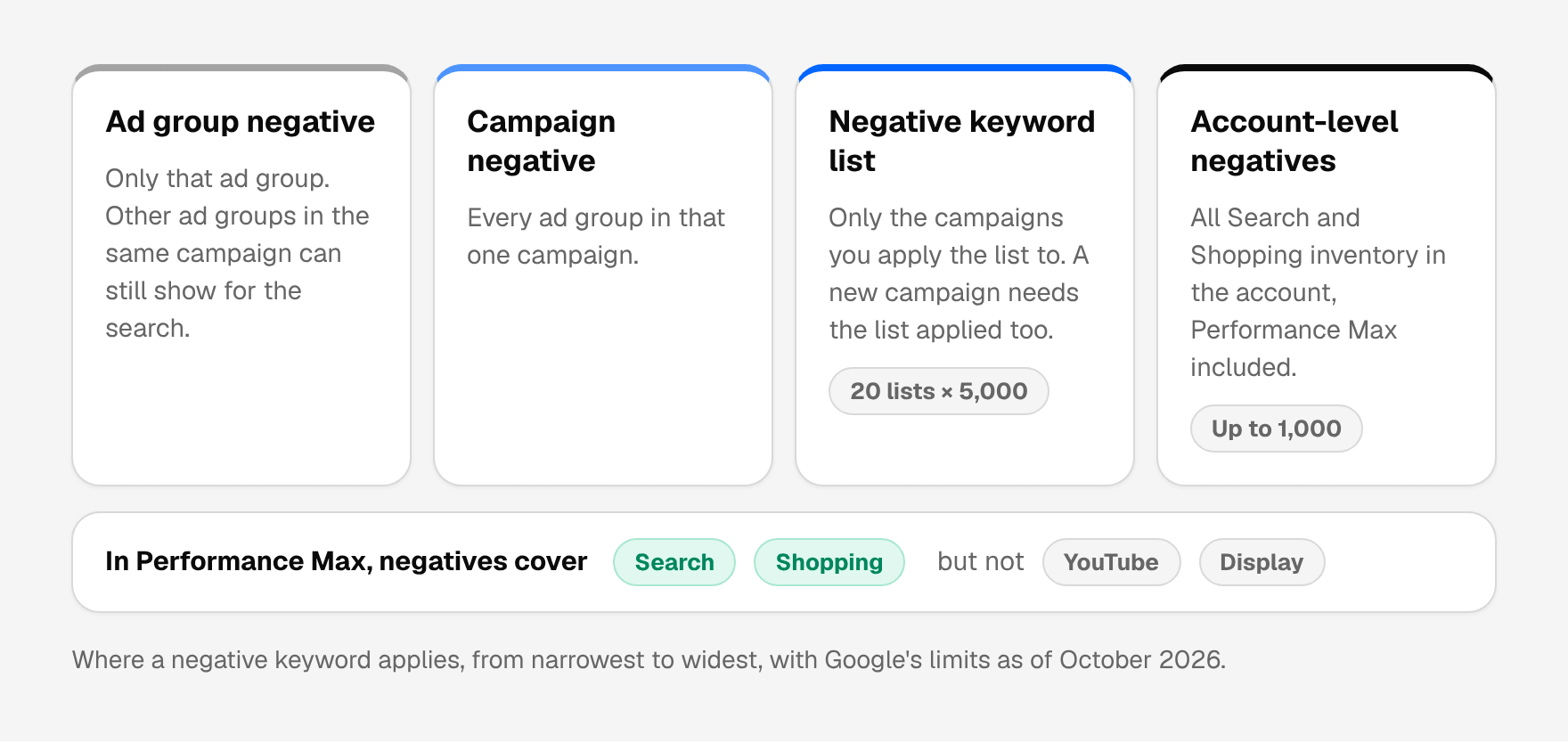
Fix: if a search is junk for your whole business (jobs, free, DIY), add it at campaign level, or to a list applied to every campaign. Google also has account-level negative keywords, set in your account settings, that apply to all Search and Shopping inventory in your account, including Performance Max. That list holds up to 1,000 negatives (About negative keyword lists, Google Ads Help).
Keep ad group negatives for one job only: steering a search to the right ad group inside the same campaign.
5. Performance Max: negatives only cover part of the campaign
Performance Max (the campaign type where Google picks where your ads show) accepts negative keywords, but Google says they apply to Search and Shopping inventory only (Negative keywords in Performance Max campaigns, Google Ads Help). Your ads on YouTube, Display and other places aren't filtered by them.
Also check where the negative actually is. A list applied only to your Search campaigns does nothing for Performance Max until you apply it there too, or move the word to your account-level negatives.
Fix: add your junk words as Performance Max negatives (or as account-level negatives), and don't expect them to clean up YouTube or Display placements. Our guide to Performance Max search terms shows where to find what people typed.
6. The junk search is a new one you haven't seen yet
Often the negative is working. The search you're looking at is just a different junk search: "dentist jobs" is blocked, now it's "dental assistant salary". People type an endless number of things.
Fix: check your search terms report every week, not once. A short look each week catches new junk before it adds up. Blocking the junk word rather than the whole search also helps: "salary" as a broad negative stops every salary search at once.
7. You can't see some of the searches at all
Google leaves some low-volume searches out of the search terms report to keep with its standards on data privacy (About the search terms report, Google Ads Help). You can't see the exact words of those searches, so you can't block them one by one.
Fix: block the obvious junk words (jobs, free, DIY, used, towns you don't serve) with broad negatives. That way you also catch searches you'll never see in the report. Our starter lists by industry are a good place to find those words, and our list of common negative keywords covers the nine junk patterns almost every account has.
How to check that a negative is working
Before you decide a negative is broken, look at the right data. You'll find the report under Campaigns, Insights and reports, Search terms (About the search terms report, Google Ads Help).
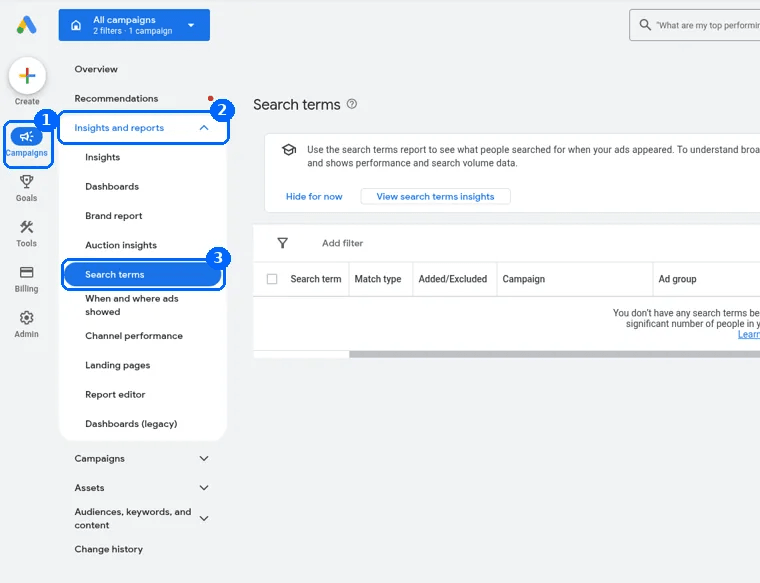
- Set the date range to start after you added the negative. A search that cost you money last month still shows in a 30-day report, even if it's blocked now.
- Look at the Added/Excluded column. It shows whether a search is already one of your keywords or already excluded by a negative. A search marked as excluded that keeps getting clicks in your new date range usually came through another campaign or ad group, where the negative doesn't apply (reasons 3 and 4).
- Check the campaign and ad group columns. They tell you exactly where the search got through, so you know where the negative is missing.
- Compare the words, letter by letter. If the search is a plural or a synonym of your negative, that's reason 1.
- Check how long the search is. Google says your ad might still show when someone types a search longer than 16 words and your negative comes after the 16th word (About negative keywords, Google Ads Help). It's rare, but it explains some very long searches.
A worked example
Here is one week of search terms for a fictional dental clinic that already uses negatives, and why each junk search still got through.
Illustrative example with a fictional clinic. These are not real searches from a client account, and no results are claimed.
| Search term | Negative already in place | Why it got through | Fix |
|---|---|---|---|
| dentist jobs | job (broad) | Plural: negatives don't match close variants | Add jobs |
| dental assistant careers | job, jobs (broad) | Synonym | Add career and careers |
| free teeth whitening kit | [free teeth whitening] (exact) | Exact match blocks nothing with extra words | Use "free teeth whitening" (phrase) |
| dentist salary | salary, in the Implants ad group only | Triggered by the Cleanings ad group | Move salary to the campaign or a list |
| emergency dentist jobs | Jobs list, applied to older campaigns | The new Emergency campaign doesn't have the list | Apply the list to the new campaign |
| diy teeth whitening at home | diy on a list applied to Search campaigns only | Came through Performance Max | Add diy as an account-level negative |
| dentist near me | None | Not junk: it converted | Keep it |
The pattern to copy: find where the search got through, then fix the word, the match type or the place the negative lives. The clinic didn't block "free" on its own, because it offers a free consultation and people search for that.
Don't overdo it
Negatives can also block searches you want. Google itself warns that with too many negative keywords, your ads might reach fewer customers (About negative keywords, Google Ads Help).
Before you add a word, check two things: did any search with that word convert, and is the word part of what you sell? "Free" is junk for most shops, but not for a clinic that offers a free consultation. "Kit" is junk for a dentist, but not for a shop that sells whitening kits. When a word is mixed, block the exact junk wording with a phrase negative instead of the single word.
A short weekly check
- Open the search terms report for the last 7 days and sort by cost. Our guide to the search terms report explains the columns.
- For each search that could never become a customer, ask: what word makes it junk?
- Add that word as a broad negative, plus its plural and synonyms.
- Put it on a list that's applied to every campaign, or add it as an account-level negative.
- Next week, check that it's gone, and look for the new junk.
Let JunkTerms do the weekly check
JunkTerms flags the likely junk in your search terms with a plain reason, keeps searches that converted, and suggests negatives for you to approve. With the JunkTerms script, it reads your search terms every week and adds only the negatives you approve to Google Ads. It never changes bids, budgets, ads or the keywords you bid on, and it starts in a dry run that adds nothing until you switch it on. With a CSV file instead, you copy the approved negatives and add them yourself. How it works shows both ways step by step.
Want to see which searches are still getting through? Analyze your search terms CSV free (no signup): it counts the likely junk in the file you download from Google Ads, and an email opens the full list. No CSV? Try a sample account on the same page.
FAQ
Why does my ad still show for a search I added as a negative keyword? Usually the search is a close variant, like a plural, that your negative doesn't cover, or the negative sits in one ad group or a list that isn't applied to that campaign. Negatives don't match close variants, so add plurals and synonyms yourself.
Do I need to add misspellings and capital letters as negatives? No. Google says negative keywords already account for casing and misspellings. You do need to add plurals, singulars and synonyms.
Do negative keywords work in Performance Max? Yes, for Search and Shopping inventory only. They don't filter YouTube or Display placements.
Why is a search I blocked still in my search terms report? Most often the date range includes days before you added the negative. Set the range to start after the change. If the search still gets clicks, check its campaign and ad group: the negative probably doesn't apply there.
Should I add negatives to an ad group, a campaign or the whole account? Add junk that's wrong for your whole business (jobs, free, DIY) to a list applied to every campaign, or as an account-level negative. Use campaign negatives for junk that's wrong for one campaign only, and ad group negatives to steer searches between ad groups.
How many negative keywords can I add? Google's limits: up to 5,000 negatives per list, 20 lists per account, and up to 1,000 account-level negatives. A Performance Max campaign takes up to 10,000 campaign negatives.
Can a negative keyword block searches I want? Yes. A broad negative blocks every search that contains the word. Before adding one, check that no search with that word converted and that the word isn't part of what you sell.
Do negative keywords work on very long searches? Almost always. Google says your ad might still show if the search is longer than 16 words and your negative comes after the 16th word.
Why can't I find every junk search to block? Google leaves some low-volume searches out of the search terms report for privacy reasons. Broad negatives for junk words catch those searches too, even though you never see them.
Can JunkTerms check my negatives for me? It reviews your search terms every week, flags the junk with a reason, and adds only the negatives you approve. It starts in a dry run and never changes bids, budgets, ads or keywords. You can try it free on a search terms CSV with no signup.
Every account gets one free analysis: run the script or upload a CSV (up to 1,000 terms).