2026-10-23
Shopping campaign negative keywords: where to add them
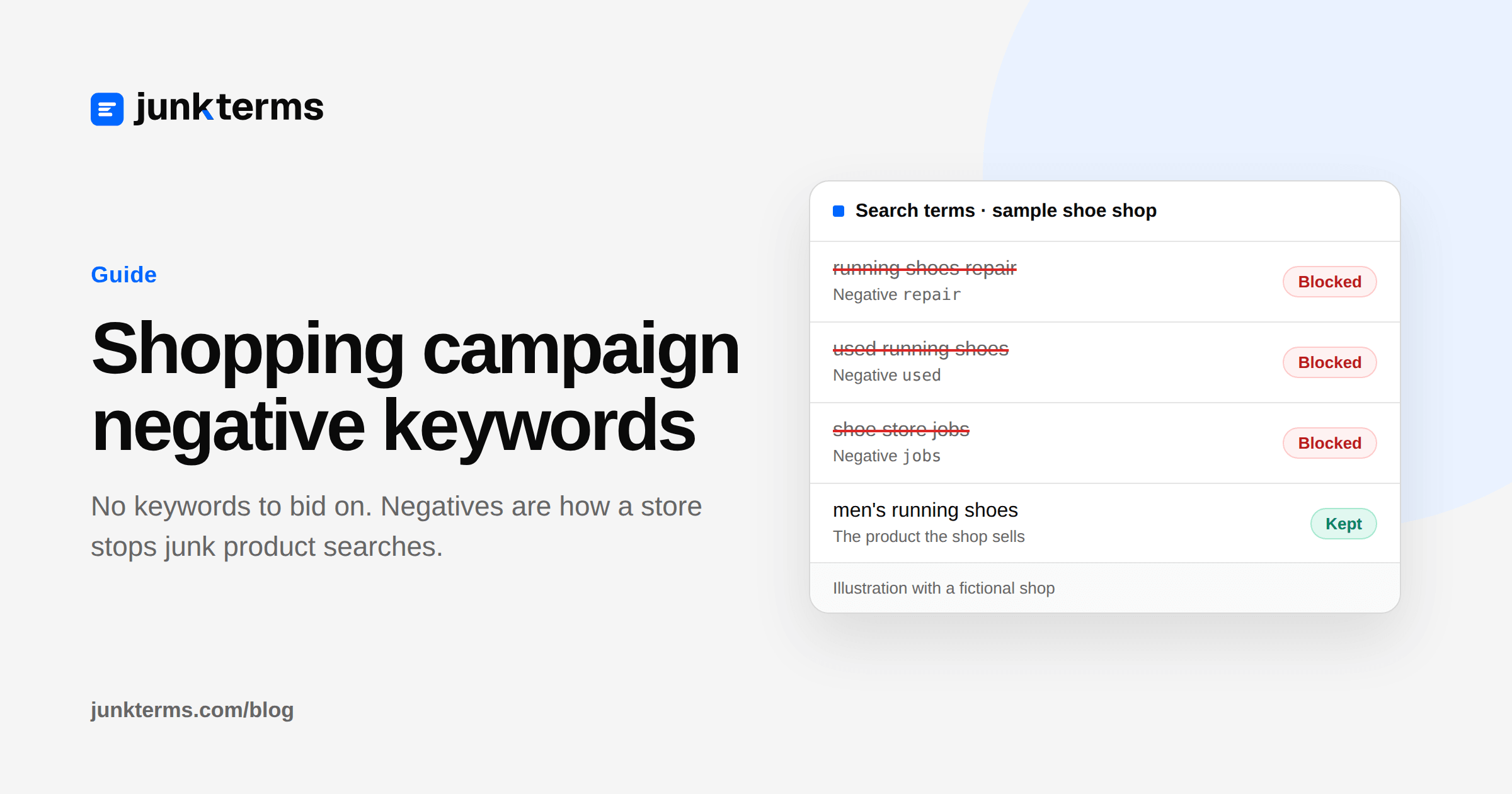
A Shopping campaign does not ask you for keywords. You give Google a product feed and a bid, and Google decides which searches can show those products. The searches you do not want are stopped with negative keywords. That is the main query control a store has.
Google puts it this way: while Shopping campaigns don't use keywords to target your ads, you can use negative keywords to help prevent your Shopping ads from appearing when you don't want them to (Use negative keywords for a Shopping campaign, Google Ads Help).
This guide is for a store owner or an in-house marketer running their own Shopping campaign. It covers where a negative goes, which match type to type, the junk intents worth checking in your own search terms, and how a Performance Max campaign differs. If you are new to the report itself, start with our guide to the search terms report.
Why negatives do the filtering
In a Search campaign you can tighten the keyword: phrase match, exact match, a smaller ad group. A standard Shopping campaign has no positive keywords to tighten. The feed says which products exist. The campaign and ad group say which of those products can enter the auction. The negative keyword says which searches should not show them.
That is why a Shopping ad can show for a search you never wrote down. Nobody added "repair" or "jobs" as a target. The product was close enough for Google, and nothing on the negative list said no.
Look for searches that are similar to what you sell, but from someone who wants a different product. Google's example in About negative keywords is an optometrist blocking "wine glasses" and "drinking glasses". For a store, the parallel is a shoe shop blocking "shoe repair". Our practical guide to Google Ads negative keywords covers the Search-campaign version of that decision. Shopping uses the same negative match types, with no positive keyword to fall back on.
Where to add them
Google's Shopping instructions let you add a negative to a campaign or an ad group. In Google Ads, open Campaigns, then Audiences, keywords, and content, then Search keywords, then the Negative search keywords tab. Click the plus button, choose Campaign or Ad group, pick the one you mean, and paste one negative per line (Use negative keywords for a Shopping campaign, Google Ads Help).
Two wider places also reach a Shopping campaign:
- A negative keyword list. You build the list once and apply it to the campaigns that should share it. From the search terms report you can add a term to an existing list or save a new list and apply it to the campaigns tied to those search terms (Get negative keyword ideas using the search terms report, Google Ads Help). A list holds up to 5,000 negatives, and an account can have up to 20 lists. A change to the list reaches every campaign the list is already applied to (About negative keyword lists, Google Ads Help). A list that is not applied to the Shopping campaign does nothing.
- Account-level negatives. In Admin, then Account settings, then Negative keywords, you keep one list for the whole account. Google says it applies to all search and shopping inventory in Search, Performance Max, App, Shopping, Smart and Local campaigns. The limit is 1,000 negatives per account (About account-level negative keywords, Google Ads Help).
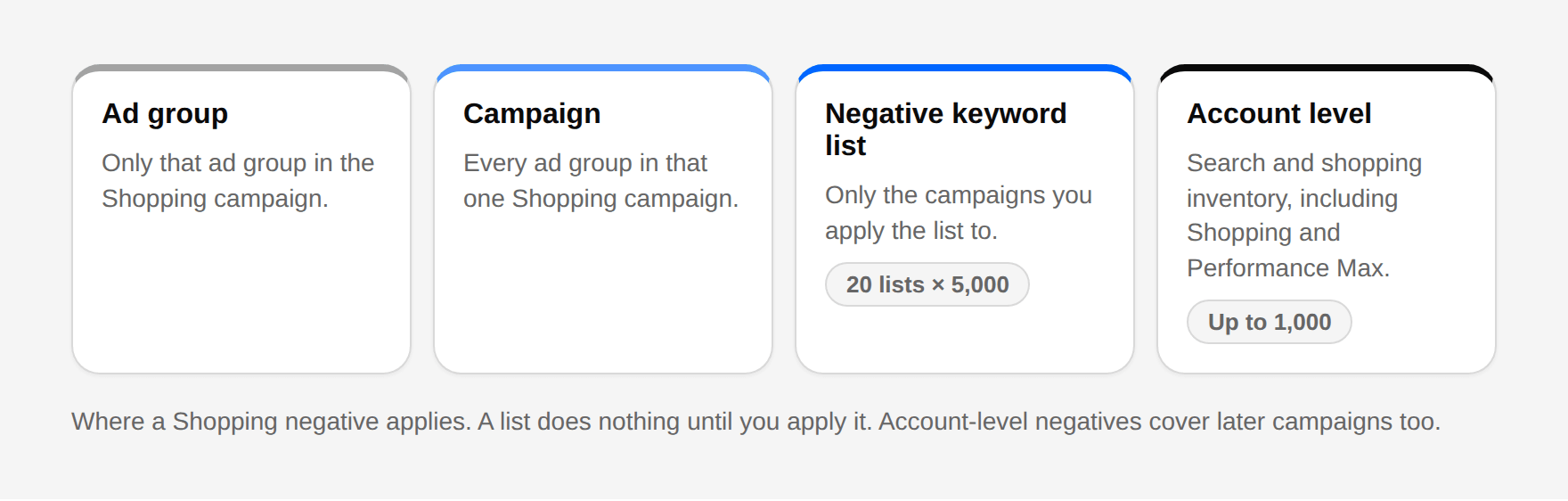
Put a word that is junk for one product group on that ad group. Put a word that is junk for the whole shop, such as jobs if you are not hiring through ads, on a list applied to every Shopping campaign, or on the account-level list if Search and Performance Max should exclude it too.
Match types: broad, phrase and exact
Negative match types are not the same as the match types you may know from Search keywords. Google says the main difference is that you need to add synonyms and the singular or plural yourself. Casing and misspellings are handled for you (About negative keywords, Google Ads Help). The Shopping instructions repeat that for broad match: add the synonyms, the singular, the plural and other variations, and they give the example of cup, glass and glasses (Use negative keywords for a Shopping campaign, Google Ads Help).
How to type them, from that same Shopping page:
- Broad is the default. Type the words with no marks, one per line. The ad does not show when the search contains all of those words, in any order. A one-word broad negative such as
repairblocks any search that contains "repair". It does not block "repairs" or "mending". - Phrase needs quotation marks, for example
"wine bottle". The ad does not show when the search contains those words in that order. Extra words before or after are still blocked. A different word, or the same words in the other order, can still show. - Exact needs brackets, for example
[bottle opener]. Only that search, with no extra words, is blocked. "bottle opener set" can still show.
Negative keywords won't match close variants or other expansions. Google's own example: the negative broad keyword "flowers" stops "red flowers", but the ad can still show for "red flower" (About negative keywords, Google Ads Help). Our guide to negative keyword match types walks through the same three types with more searches.
![Table of Shopping negative match types using Google's examples: broad cup blocks red cup but not the synonym glass or the plural cups; phrase "wine bottle" blocks blue wine bottle; exact [bottle opener] blocks bottle opener but not bottle opener set.](/_next/image?url=%2Fimages%2Fguides%2Fshopping-negative-match-types.png&w=3840&q=90&dpl=dpl_5g1VXbvrKRjio8scuvmdLtuXH4Ln)
Use a broad negative for a single junk word that never appears in a search you want, such as jobs. Use a phrase negative when one word in the junk phrase is also a word buyers use ("free pattern", not free, if you still want "free delivery"). Use exact when only one search is the problem.
Add them from the search terms report
The list of what people typed is the search terms report. Google says it shows actual terms that a significant number of people searched for which triggered your ad, and that you may spot terms that are related to what you sell but are not exactly it (Get negative keyword ideas using the search terms report, Google Ads Help).
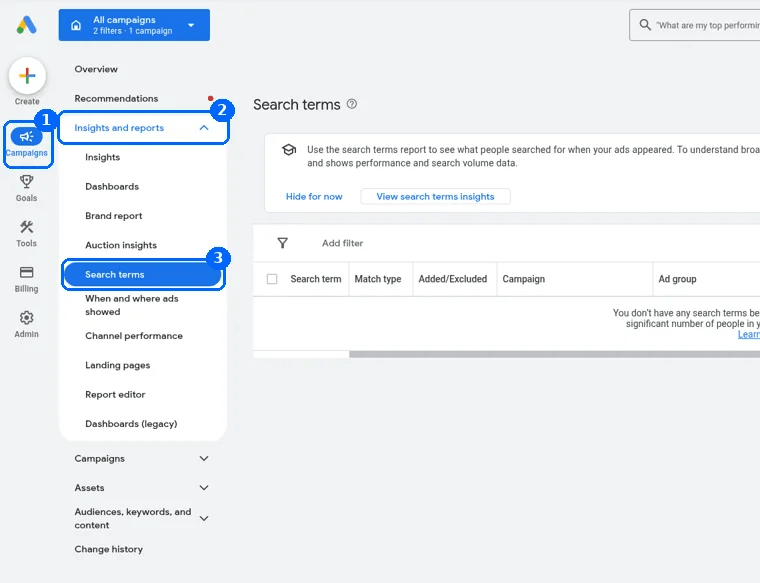
Open Campaigns, then Insights and reports, then Search terms. Check the rows you do not want, then click Add as negative keyword. From there you can add them to the ad group or campaign tied to those rows, to an existing negative keyword list, or to a new list that is applied to the campaigns tied to those rows.
One default is easy to miss. Google says that by default, negative keywords added to a Search campaign from this report are negative exact match. To use phrase or broad instead, add the quotation marks or leave the word unmarked. The note on that page is about Search campaigns. On a Shopping campaign, the plus-button flow above is where you choose campaign or ad group and type the marks yourself.
Junk intents worth checking in your own report
These are examples to compare with your search terms, not a list to paste in. A word that is junk for one shop is the product for another. Read the last few weeks of your own report before you add anything.
- DIY and how-to. "how to hem jeans", "sewing pattern". They want instructions, not the product. A clothing shop that sells finished clothes usually blocks these. Our starter list for fashion ecommerce includes "sewing pattern" for that reason.
- Repair. "running shoes repair", "zip replacement". You sell a new product, not a repair service. If you do offer repairs, keep the word.
- Jobs. "warehouse jobs", "fashion jobs". People looking for work. Safe for most stores that do not hire through Shopping ads.
- Used and second-hand. "used", "thrift", "preloved". Fine to block when you sell new stock. Wrong to block if vintage is what you sell.
- Wholesale. "wholesale suppliers", "bulk buy". Shoppers and trade buyers are different. Block wholesale only if you do not sell wholesale.
- Free. "free", "free pattern", "free shipping code". "Free" as a broad negative also blocks "free delivery" and "free returns", which can be people ready to buy. Prefer a phrase such as
"free pattern"unless the report shows that every "free" search is junk. - Wrong category. Google's own account-level example is a sporting-goods store that sells workout clothes and excludes "dress pants" and "blouses" (About account-level negative keywords, Google Ads Help). Use the same test: a search for a product you do not stock.
Check each candidate against searches that already converted. If "cheap" shows up on orders, do not block "cheap". If it only shows up on browsers who leave, a phrase negative for the worst queries is safer than blocking the word everywhere.
A weekly review
New variants show up after you block the first wording, because negatives do not cover plurals and synonyms for you. Once a week, open the search terms report for the last 7 days, sort by cost, and mark searches that could never buy what that campaign sells. Add the shortest negative that removes them, plus the plural or synonym already in the report. Shop-wide words go on the shared list. One-campaign words stay on that campaign.
If the same searches are still spending next week, see negative keywords not working: the plural was never added, the list is not applied, or the negative sits on one ad group only.
How Performance Max differs
A standard Shopping campaign and a Performance Max campaign both show Shopping ads, and both accept negative keywords. They are not the same control.
On Performance Max, Google says negative keywords apply to Search and Shopping inventory only (Negative keywords in Performance Max campaigns, Google Ads Help). You add them on the Negative keywords tab, pick the Performance Max campaign, and type one per line or choose an existing negative keyword list. Match type is set with the same symbols. Account-level negatives also apply to search and shopping inventory inside Performance Max (About account-level negative keywords, Google Ads Help).
A negative on a standard Shopping campaign does not move to Performance Max unless it is account-level or on a list you have also applied there. Where to read the searches is in our guide to Performance Max search terms.
A worked example
Illustrative example with a fictional shop. These are not real searches from a store's account, and no results are claimed.
The shop is Northline Running. It sells new running shoes online and does not repair shoes, hire through ads, or sell used pairs. One Shopping campaign, one ad group for road shoes.
| Search term | Decision | Negative to add | Where it goes | Why |
|---|---|---|---|---|
| running shoes repair | Block | repair (broad) | Shopping campaign | A repair, not a purchase. The shop does not offer it. |
| shoe repairs near me | Block | repairs (broad) | Same campaign | The plural is a separate negative. repair does not cover it. |
| used running shoes | Block | used (broad) | List applied to every Shopping campaign | Second-hand. The shop sells new stock only. |
| running shoe jobs | Block | jobs (broad) | Account level | Hiring. It should stay out of Search and Performance Max too. |
| free running shoe pattern | Block | "free pattern" (phrase) | Shopping campaign | A DIY search. Phrase match leaves "free delivery" alone. |
| wholesale running shoes | Block | wholesale (broad) | Shopping campaign | Trade buyers. The shop sells to shoppers. |
| men's running shoes | Keep | None | None | The product the campaign exists to sell. |
| cheap running shoes | Keep for now | None | None | Price language. Block it only if your own orders show it never buys. |
Don't block the words your buyers use
Google warns that if you use too many negative keywords, your ads might reach fewer customers (About negative keywords, Google Ads Help). On Shopping that matters more, because no positive keyword brings the query back. Leave a word alone when it shows up on searches that buy, and keep the account-level list short: the cap is 1,000, and it covers every later campaign too.
Let a weekly pass find the new ones
JunkTerms reads that search terms CSV, marks the likely junk with a plain reason, and leaves the list for you to approve. Nothing is added to the Shopping campaign from the free check.
Analyze your search terms CSV free (no signup). It counts the likely junk in the file you download from Google Ads, and an email opens the full list. No CSV? Try a sample account on the same page.
FAQ
Do Google Shopping campaigns use keywords? No. Google says Shopping campaigns don't use keywords to target your ads. You use negative keywords to stop Shopping ads showing for searches you don't want.
How do I add negative keywords to a Shopping campaign? In Google Ads open Campaigns, then Audiences, keywords, and content, then Search keywords, then Negative search keywords. Click the plus button and choose the campaign or the ad group. You can also add them from the search terms report, to a negative keyword list, or at account level.
Do negative keywords for Shopping match close variants? No. Negatives don't match close variants or other expansions. Add the singular, the plural and synonyms yourself. Google's Shopping instructions give cup, glass and glasses as the kind of variations to add for a broad negative. Casing and misspellings are handled for you.
What is the default match type for a Shopping negative? Broad. Type the word with no quotes and no brackets. Use quotes for phrase match and brackets for exact match.
Are negatives added from the search terms report exact match? When you add them to a Search campaign from that report, Google says the default is negative exact match, and you change it with the match-type symbols. On a Shopping campaign, set the match type yourself when you paste the negative.
Do account-level negative keywords apply to Shopping? Yes. Google says the account-level list applies to all search and shopping inventory in Shopping campaigns, and also in Search, Performance Max, App, Smart and Local campaigns.
How many account-level negatives can I add? Up to 1,000 per account. A shared negative keyword list is separate: up to 5,000 negatives on a list, and up to 20 lists, applied only to the campaigns you attach.
Can I use a negative keyword list on a Shopping campaign? Yes. Build the list, then apply it to the Shopping campaign. From the search terms report you can also add terms to an existing list or save a new list and apply it to the campaigns those search terms came from. A list that is not applied does nothing.
Do Performance Max negatives work the same as Shopping negatives? Not quite. On Performance Max, Google says negative keywords apply to Search and Shopping inventory only. A negative on a standard Shopping campaign does not move to Performance Max unless it is account-level or on a list you have also applied there.
Can JunkTerms find junk searches in a Shopping campaign? It reads a search terms CSV, flags the likely junk, and leaves the negatives for you to approve. The free check needs no signup. You still add the approved negatives to the Shopping campaign yourself.
Every account gets one free analysis: run the script or upload a CSV (up to 1,000 terms).